
Best Poker HUD Software for 2026
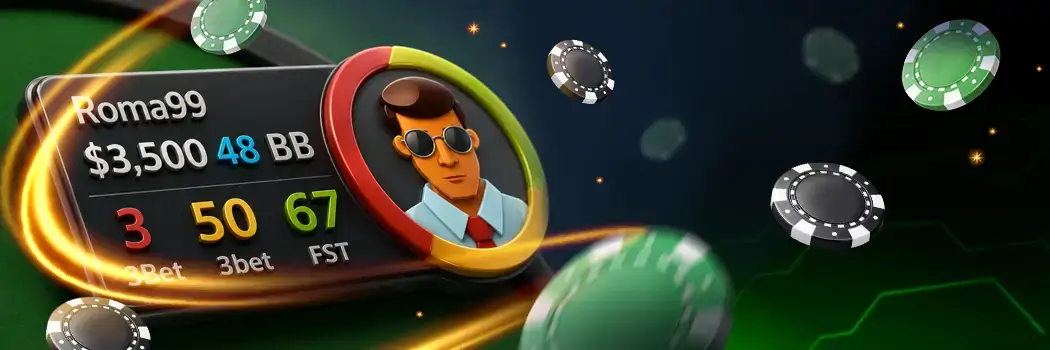
A poker HUD is a special tool that gives you statistical information about the opponents. It is displayed at the game table in real time. HUD often comes as a standalone software, or it may be a part of poker trackers and other programs, e.g., Holdem Manager.
This HUD poker review explains what this software actually is, explains the core stats it can depict, and gives a brief overview of the best HUD software on the market.
What is a Poker HUD?
HUD stands for Heads Up Display. Essentially, it is a tool for displaying statistics collected on rivals over the entire time you play against them. It looks like a small table with numbers near the user's nickname. Enabling HUD, you can see whether a regular or a recreational player sits next to you.
Poker HUD shows statistics for each punter as well as the general table stats.
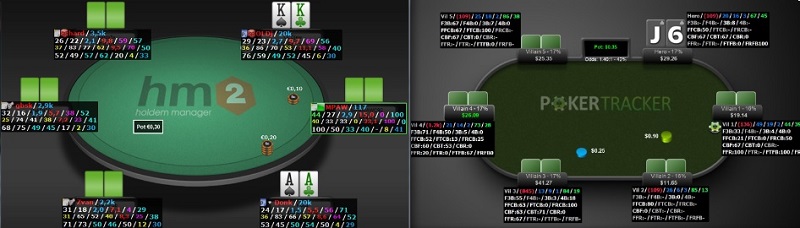
Except for the statistical indicators in the main panel (as shown in the picture below), HUD includes pop-up functionality. You can also update information with notes.
Visualized format of HUD HM2 and HUD PT4 (hand replayer):
Best Poker HUD Software – Top 5
Take a look at the five best poker tools offering HUD functionality:
| Criterion | Hand2Note | PokerTracker 4 | Holdem Manager 3 | Juronjin Poker | StarsCaption |
|---|---|---|---|---|---|
| HUD type | Static, positional, dynamic | Static and positional | Positional & static | Situational overlay | Static |
| Stats count | 500+ | 500+ | 2,000+ | n/a | Only the essential values |
| HUD customization | Layout editor with custom color templates, flexible overlay opacity | Drag-n-drop overlay editor; NoteTracker that makes notes on opponents automatically during the game | Allows adjusting the layout, displayed values, and assigning colour batches | Adjustable table layout and focus slots | Base-level colour and font adjustments |
| Popup features | An extended pop-up on each metric | The pop-up opens by clicking on a specific stat or by clicking on the whole HUD | Provides situational pop-ups with clean tabs | Not available | Basic pop-ups support |
| Pricing model | Subscription-based | One-time purchase | One-time purchase | Subscription-based | Subscription-based |
| Best for | Seasoned regs who want to enjoy the advanced HUD functionality | Mid-stakes regulars seeking the opportunity to build highly customised HUDs | Beginners and intermediate-level punters who prefer graphical representation over text-heavy grids | Newcomers and experienced grinders seeking live math mechanics | PokerStars tournament and cash games players seeking the approved HUD tool |
Hand2Note
What makes this option stand out is its dynamic adaptability. Users can customise the dynamic HUD so that it shows relevant data based on their position, stack size, and number of occupied seats. This display changes the visible stats intuitively. It also differentiates opponents’ hands played against “fish” or “regs”, ensuring the figures' accuracy.
👉 See our detailed Hand2Note review.
PokerTracker 4
This software incorporates a vector engine for HUD and claims to have the most advanced functionality on the market. Stretch, shrink, or resize your table in any way you want – the text on the panel adjusts properly. With the advanced pop-up system, you won’t skip any critical information and make a proper decision at any street.
👉 See our detailed PokerTracker 4 review.
Holdem Manager 3
This option is popular among the fishes as well as seasoned regs. HM3 introduced a graphical HUD poker overlay where colours, not numbers, give punters information on opponents’ stats. The badges that appear to represent specific tendencies in behaviour, such as over-folding to continuation bet, are extremely informative.
👉 See our detailed Holdem Manager 3 review.
Jurojin Poker
Instead of tracking the historical player behaviour, Juronjin relies on Live Math. Instead of building a database of rivals’ tendencies, the software shows real-time mathematical context. Pot Odds, Stack-to-Pot Ratio (STR) and Effective Stack help to make reasonable decisions. Users applying mixed strategies will appreciate the Random Number Generator (RNG) box in the overlay.
StarsCaption
Designed specifically for the PokerStars client, it upgrades the native interface with features it lacks. Thus, it’s the best poker HUD for Stars fans. People can access VPIP, PRF, fold to c-bet and other essential stats in the overlay. With the custom text panels, every user can see the information the client doesn’t show: previous street history, current bet-to-pot ratio, etc.
👉 See our detailed StarsCaption review.
Important Poker HUD Stats
HUD can cover many different statistics. But if it shows all of them at once, it will only clutter the space and confuse you even more. Very few parameters are used in the standard HUD. Many tools provide us with individual configuration – you can choose what will be displayed in HUD and pop-up, as well as highlight picked metrics with different colours.
Core HUD Stats
The standard HUD poker window includes the following indicators and values (by default):
- Name – user’s nickname.
- Notes – icon for recording the notes.
- Hands (Total Hands) - the number of hands on which the value is based. In other words, this is the number of hands that you played with a particular foe and which entered the base.
- Stack Size – the size of the stack in BB (it is in PT4, but not in HM3).
- VPIP (VP, TOT VPIP) is an indicator in poker HUD that shows in percentage how often the player enters the pot on preflop (without blinds). The optimal range is 15-25% for 9-max or 20-29% for 6-max. If the value is lower, it means that the foe plays too tight, and when it is above, then the rival is a loose one.
- PFR (PR, TOT PFR) is a percentage of how often the user raises on preflop (open raise, 3bet and all subsequent wagers). The optimum ratio is 10-20% in 9-max and 16-24% for 6-max. The lower the numbers are, the narrower the range of hands is played. The higher the percentage, the wider the range.
- 3Bet (3B, TOT 3bet) – the frequency of 3bet on preflop. Optimum – 6-10%.
- Postflop Aggression Factor is the main metric of the foe’s aggressiveness (some poker HUDs show it by default; others require manual configuration). It is calculated by the formula (% wager +% raises) / % calls. The higher the value is, the more aggressively the punter plays.
- Flop CB (CB) – how often the rival makes a CBet on the flop (in HUD PT4 by default, but it is configured in HM2).
- Fold vs Flop CB – how often the opponent mucks cards to CBET (by default in PT4 HUD).
Advanced Indicators for Cash Games & Postflop
What stats should be in a poker HUD? For cash players, the main metrics in HUD, in addition to the ones set by default, are the following:
- Big Blinds value displays the stack size.
- Flop Cbet – a user wagers on the flop after raising on the pre-flop.
- Flop Fold to CBet reveals how frequently someone gives up against a continuation bet.
- TOT Fold to Steal, which shows how often your rival folds cards in response to a steal. The higher this parameter is, the more often you will be able to steal the blinds from this player.
The most important poker HUD metrics to pay attention to postflop are the following:
- WTSD displays in percentage how often one reaches a showdown. The higher this value is, the less you need to bluff.
- W$SD is a percentage of one’s winnings after the showdown. This indicator demonstrates the person's ability to play on postflop. The higher the percentage, the more often the opponent wins on showdown.
- W$WSF depicts how often the punter wins a deal after seeing the cards on the flop.
The optimal values of preflop and postflop metrics (for 6-max) in poker HUDs are the following:
Preflop statistics
| Statistical indicator | Average value |
| VPIP (%) | 20 - 29 |
| PFR (%) | 16 - 24 |
| PFR/ VPIP Ratio | 72 - 85 |
| EP RFI | 12 - 18 |
| MP RFI | 12 - 18 |
| CO RFI | 25 - 33 |
| BTN RFI | 40 - 55 |
| SB RFI | 40 - 55 |
| 3 Bet | 6 - 10 |
| Squeeze | 4,5 - 6 |
| 4 bet range | 1,6 - 2,8 |
| Call 3 bet | 25 - 35 |
Postflop statistics
| Statistical indicator | Average value |
| WTSD (%) | 23 - 28 |
| WSSD (%) | 45 - 53 |
| WWSF | 41- 52 |
| Flop Aggression (%) | 43 - 50 |
| Turn Aggression (%) | 25 - 36 |
| River Aggression (%) | 21 - 28 |
| Flop Cbet (%) | 60 - 67 |
| Turn Cbet (%) | 47 - 55 |
| River Cbet (%) | 50 - 55 |
| Flop Fold to Cbet (%) | 40 - 50 |
| Turn Fold to Cbet (%) | 40 - 50 |
| River Fold to Cbet (%) | 40 - 50 |
You should try to keep your performance metrics within the normal range and play as carefully as possible against the rivals with an average value.
Who Should Use Poker HUDs?
This tool is irreplaceable for players of all levels who plan to treat poker as something bigger than mere entertainment. Whether you’re a recreational punter exploring poker math or a seasoned reg grinding dozens of tables at once, HUD gives you an edge. With the live stats display, you gain insight into the opponent's tendencies and know how to exploit them in your favour.
![Maksym Baksheiev]() Maksym BaksheievCEO of Cardmates UK
Maksym BaksheievCEO of Cardmates UKHow to pick a poker HUD that fits you best?
For me, it’s impossible to select an ideal HUD for MTTs or cash games. It is too individual. I think everyone should focus on understanding how to tailor the software to one's needs rather than searching for a “ready” HUD on the Internet.

Poker Rooms Supporting HUD
Most licensed UK poker sites don’t treat third-party HUD software as an advantage; thus, players are free to use it. Here are the rooms supporting it:
GGPoker and PartyPoker strictly ban the use of third-party HUD poker software.
Main Rule for Easy HUD Setup
The key aspect you must adhere to is to display only those stats that you understand and that give you useful information on your opponent. Incomprehensible numbers that are not helpful only clutter the space and confuse the punter. You need to understand how each indicator is formulated and how to use it correctly.
For example, if you see that you are sitting in a position against the player who has high Fold vs Flop CB, you can boldly make a bluff bet against him, since you know that there is a high probability that he will muck cards.
If you doubt whether it is worth entering the game with certain cards, then your foes’ VPIP and PFR will tell you the chance that shows whether you will fight for the pot alone or not.
Cardmates Verdict
Those who want to switch from mere guessing and make decisions based on facts need to utilise the power of a poker HUD. It’s impossible to remember every action made by your opponents, especially at 6 or 9-max tables.
This is where this tool comes to the aid. With the essential stats right at your fingertips, you’re getting very close to increasing the win rate and becoming a table crusher.
FAQ
⭐ Is poker HUD software considered an unfair advantage?
Most of the HUDs aren’t considered the tool that gives players an unfair edge. They only collect and show the essential information but do not suggest how to act to win – each punter analyses the data and makes the proper decision.
❓ Are HUDs allowed in major poker rooms?
The rules vary even among the major UK poker sites. The giants like PokerStars, 888poker, and William Hill don’t prohibit the use of third-party HUD tools as well as their own software, such as StarsCaption and 888Caption. PartyPoker has banned external programs, but it allows the use of HUD in PartyCaption, a tailored software. GGPoker has a built-in display, thus bans side options.
🔍 Which are the top poker HUD stats to pay attention to?
VPIP, 3Bet and PFR are the key values most regs pick to be visible in HUD. VPIP shows how frequently the player wagers, while 3Bet defines the rate at which the opponent re-raises. PFR assesses the rival’s power as a pre-flop raiser. These give insight into whether the foe’s playstyle is loose, tight, or aggressive.
🔥 What is the best poker HUD for tournament players?
Hand2Note and Poker Tracker 4 are good picks for tourney grinders. With both, you can filter your foes' metrics based on effective stack depth. Those who frequently join tournaments on PokerStars should consider StarsCaption to benefit from automated stack conversion.
💵 What is the best HUD for cash poker players?
Cash multi-tablers who don’t want to encounter the data-heavy HUD will appreciate the functionality of Juronjin. At the same time, the massive amount of information in Hand2Note will resonate with the data-driven punters. It’s up to each grinder to test the capabilities of different tools and find the right one.
✨ Which poker HUD will best suit beginners?
The visual representation of stats in Holdem Manager 3 makes it a top choice for entry-level users. Complex databases may scare off beginners. HM3 thus focuses on easy setup, badges and clean pop-ups for quick entry into HUD nuances.




Please, login or register.