
PartyCaption: Everything You Need to Know (2026)
PartyCaption is the inaugural program in the Caption series, developed in 2012. It provides users with additional features when playing on PartyPoker and other networked platforms, where its usage is entirely legal.
It offers HUDs for real-time stats, coloured notes to distinguish opponents, customizable fonts and a range of other features that generally enhance the game. The tool provides an additional edge in multi-table play, but even recreational punters who run one table find it effective.
In this PartyCaption review, we will go over its key functionality. Based on our testing, we provide our expert insights into the tool and who will benefit from using it. Software price and how to use it for free are also discussed on this page.
What is PartyCaption?
PartyCaption is a helper software for playing on PartyPoker and any other poker skin on bwin.party network. This multi-purpose tool includes hotkeys, coloured notes, an automatic table manager and a customizable HUD, among other features. These reduce routine work, making your sessions in the eligible room as comfortable as possible.
PartyCaption is officially approved for unrestricted use on PartyPoker.
The software does not replace trackers (such as Holdem Manager 3 or PokerTracker 4). But at the same time, it perfectly complements them. It provides people with capabilities that neither trackers nor poker clients deliver.
What Does PartyCaption Exactly Do?
The assistant tool makes one’s play more convenienеt. It arranges tables and performs typical actions instead of the user, so that they focus on the game and are not distracted from it. E.g., hotkeys let you do things super fast and eliminate the need to click through menus. If you run several tables, the software will highlight one that needs action so that you do not miss your turn.
PartyCaption Features at a Glance
We’ve rounded up the list of features that Party Caption offers, and it includes:
- Setting up the fonts.
- Stack/bet indicators are displayed in blinds.
- Bet script functionality.
- Hotkeys that make gameplay more laid-back.
- Possibility to remove all unnecessary elements from the client's lobby and table.
- Auto time-bank.
- Automatic additional purchasing (auto-addon) in cash games.
- Auto-buy-in and auto-rebuy for cash tables.
- Unique layouts for Partypoker.
- Opportunity to find out the rival's country of residence (perfect for especially curious ones).
- Opp buttons – these are four hotkeys for various actions against opponents.
- For multi-tablers: tables have different highlighting based on characteristics.
- Table Manager arranges table layouts to suit your preferences.
- Integration with Hand2Note.
Customizable HUD
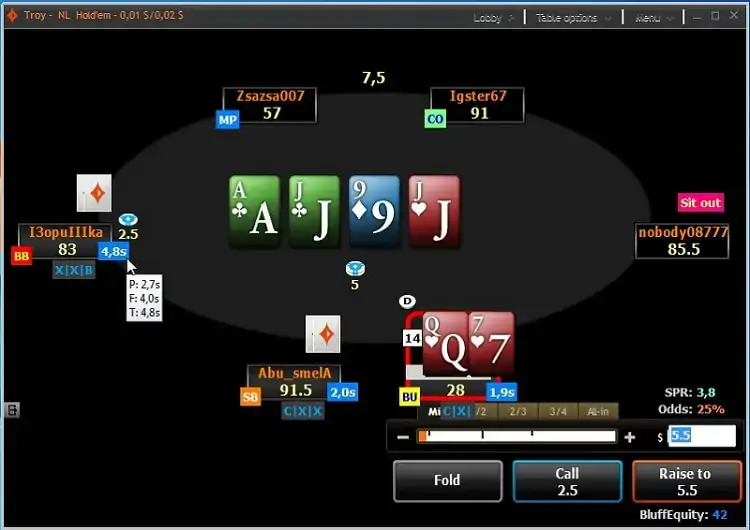
HUD (Heads Up Display) in PartyCaption, by its nature, does the following:
- Shows background details: session duration, hands played, etc.
- Features pot odds and bluff equity.
- Displays opponent’s losing hands at showdown.
Also, the software provides essential tournament information. You don’t have to navigate to the dedicated lobby to know your current place or the number of rivals because everything is within reach.
If you need to move the table around the screen, use the HUD panel. The option of locking is also there – it saves from misclicks. Our criticism is that punters are not able to adjust the size of the window manually. You can change the opacity, though.
Fast Colour Notes
Convenient creation of colour-coded notes lets you categorize your foes quickly. Mark unpredictable with one colour, and use the other to label aggressors or passive rivals. Having such a profile in front of the eyes is very useful, as it allows the punter to quickly identify the opponent and adapt plays to exploit their weaknesses. That gives you a tactical advantage at the poker table.
To understand how to set up Party Caption, poker enthusiasts should acquaint themselves with a detailed tutorial in our separate article dedicated to 888caption, as this process is identical for both programs.
Who is PartyCaption Best For?
UK players of all levels will find the automatic time bank, colour notes and the tool’s other features effective. It has a clear, intuitive interface, so even beginners can start using it as soon as they download a compatible poker client. We did not experience any troubles while testing it for a week.
PartyCaption is the best fit for:
- Multi-tablers. Those who usually grind several cash tables at once and want proper management control over them.
- Punters who stick to HUDs. Stats such as player positions, pot odds, SPR (stack-to-pot ratio) and bluff equity help with correct plays.
- Hand2Note users. PartyCaption's HUD perfectly integrates with the H2N database, displaying real-time information about the foes and their betting patterns. Just right for exploiting opponents.
Software Price and Trial Version
You can buy an annual license on the developer’s website. PartyCaption price is quite affordable – $30/per year, and it can help you reach a new level in poker. If desired, there’s an opportunity to pay for a shorter period at the rate of $3.5 per month of use.
One can test-drive the tool at no cost with a 1-month trial period. Once expired, it returns to the basic mode of operation. Download the latest free version to check if it suits you before purchase.
Micro-stakes players use PartyCaption absolutely for free in cash games up to NL10 and in tournaments with a $3 buy-in or less. If other limits are detected, the app closes automatically.
Cardmates Verdict
PartyCaption is valuable and undoubtedly worth the money its developer is asking for it.
Those playing at micro-stakes are lucky, as they can use it free of charge. Those who prefer grinding NL25+ will have to fork out a bit, but, as practice shows, the program pays for itself in a couple of days of use. And its interaction with poker trackers allows both recreational players and pros to fully realize their gaming potential.
For inexperienced punters, PartyCaption might be a bit complicated during the first hours of use and, particularly, during the configuration process. As for drawbacks, there is no session timer history for tracking weekly or monthly engagement. And the only way to get support is via the 2+2 poker forum.


#Ad 18+ Full T&C apply. GambleAware. New UK players only; min £10 deposit; 100% up to £1,000 deposit bonus paid in cash. £50 Free Play in P$, Partypoker Tour Path & SPINS Overdrive tickets released over 6 days. 14-day ticket expiry.
FAQ
✅ Is PartyCaption allowed on Partypoker?
Yes, PartyCaption is officially allowed to be used in the room with an open client. It is an auxiliary software that makes the play convenient in general. The tool does not provide any real-time prompts on player decisions, unlike solvers, which are typically banned.
⚙️ What settings are needed for PartyCaption correct operation?
No complex settings are required. For the program to function adequately, you should install the latest version of the Partypoker client (or update it) and run Party Caption as an administrator. Both Windows and Mac computers are suitable.
💻 Where can I safely download the current PartyCaption version?
Visit the manufacturer’s original site to get the latest official version. Users playing at low stakes get the software for free. Plus, there is a 30-day trial period for testing the software's full potential in MMTs and at cash tables. The paid license fits all stakes and has no restrictions.
📌 Can I create separate PartyCaption HUDs for cash tables and tournament?
Yes, you can do that easily. Use the tag [!c] for cash games and [!t] – for the tournament. Only one HUD will appear at any given time, so arranging both in the same place will not cause any problems.





Please, login or register.