
PokerTracker 4 Review & Guide (2026)

PokerTracker 4 (PT4) is an all-powerful software for upgrading your poker skills. PT4 allows you to find and eliminate leaks in your game, as well as get the most out of your opponents’ mistakes. This is one of those programs that you need to customise "for yourself." Use this guide to explore the basic and advanced features of PokerTracker 4, see how it works. Discover the differences between pricing plans and learn the key pros and cons.
What is PokerTracker 4?
It’s among the most popular poker trackers and HUD (Heads-Up Display) software options, created by Max Value Software, LLC. The capabilities of this multi-purpose learning tool expand far beyond tracking and analysis.
PokerTracker 4 supports cash games, MTT, Sit&GO, Spin&Go, fast poker (ZOOM, BOOST, etc.) and all possible betting structures: No-Limit, Pot-Limit, Fixed-limit.
Poker Tracker 4 Core Features
This tool is packed with various instruments to improve your skills and performance at the Texas Holdem, Omaha, and Omaha Hi-Lo tables. The basic PokerTracker 4 functionalities cover the following:
- Collection, storage and analysis of all played hands;
- Analyses of opponents’ play;
- Statistics output on every player in a real-time mode;
- Calculation of stacks;
- A lot of stats indicators;
- The tables of game results;
- Additional modules with irreplaceable functionalities;
- And many other things.
Advanced Tools of PokerTracker 4
Let’s review some of the essential features in detail:
- Improved HUD. In online mode, the hands’ review and their marking are available. During the game, the chip account in the big blinds is displayed, and you can filter the effective stacks in tournaments, choosing between the statistics of a separate table and the general ones. There is also a drag-and-drop functionality that gives an opportunity to create the user's HUD (a set of statistical parameters, transparency, colours, etc.) a lot faster than before.
- Leak Tracker. This tool can analyse the hand history and compare it to the performance of winning players in its database. It reviews each stats aspect separately: in terms of position, table size, and stakes. To help beginners use this information wisely, PokerTracker 4 supplements Leak Tracker with instructional videos.
- Reports' creation. It is an excellent tool for making informative reports for each game situation. Any document can be configured and saved. By the way, the reports can be displayed both in the form of tables and graphs. There are filters to sort out the reports. Custom Scatter Graphs help to filter statistics by viewing the players from different points of view.
- Equity calculator. Punters can access this feature in the hand history replayer or turn it on during gameplay. It’s a traditional calculation software to understand own chances against the opponents.
- ICM. The Independent Chip Model tool is used to review past hands and identify the reasonable decisions (fold or push) at the final tournament tables, and learn the strategies in the ICM Quiz. Additionally, the simulation mode allows you to recreate SNG and MTT conditions to learn how to act wisely.
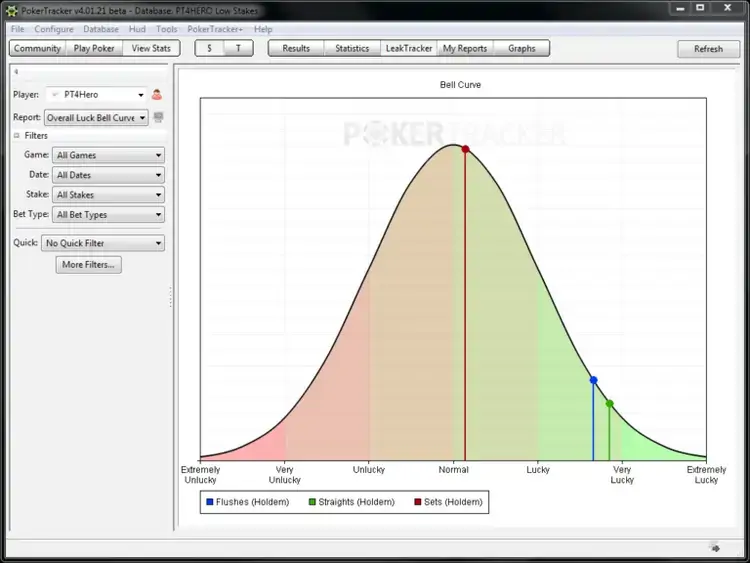
Looking for how to install PokerTracker 4 and configure it? We have a separate guide with step-by-step instructions - check it out.
How to Use PokerTracker 4?
The PT4 installation process is really simple: you download the file, follow the prompts in the setup guide, and install PostgreSQL. Learn how to use the equity calculation tool:

Launch it from the Tools tab, so it opens in a separate window. Open the drop-down Game menu and choose Holdem, Omaha poker, or Omaha Hi-Lo.
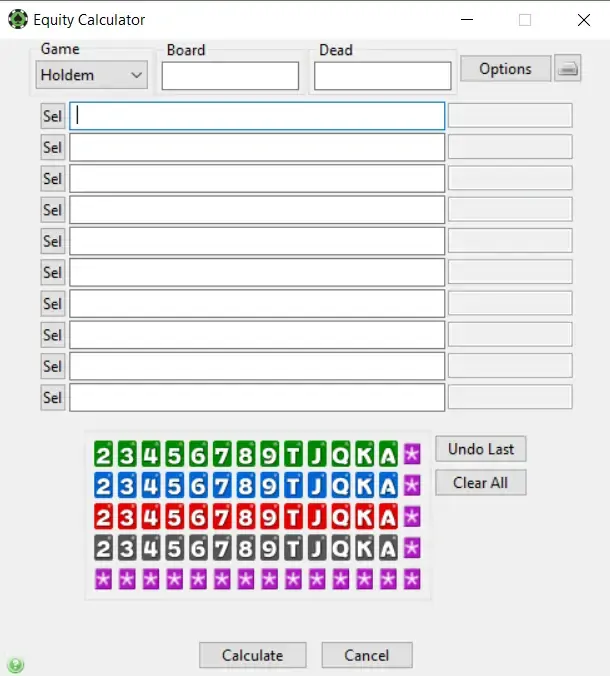

Start by defining the board, enter dead cards, and then fill out the grid below with the users’ pocket cards. You may fill selectors with precise cards or choose the Random option for some lines if you want.

Hit the corresponding button, and the tool will provide each player with the exact EV against the assigned ranges.
PokerTracker 4 Pricing Plans
The licensed version is available in several variants, depending on the pastime version you plan to play and the preferred stake levels. Each package comes in two options:
- Small Stakes. It’s a cheaper version with restrictions on max wagers:
- No Limit (NL) & Pot-Limit (PL): $0.25/ $0.50
- Fixed Limit (FL): $0.50 / $1.00
- Tournaments & SNG: up to $22.
- All Stakes. Allow you to play at any stakes.
Take a look at the prices for available PokerTracker 4 packages:
- Omaha. $64.99/ $99.99
- Holdem. $64.99/ $99.99
- Omaha & Holdem. $99.99/ $159.99
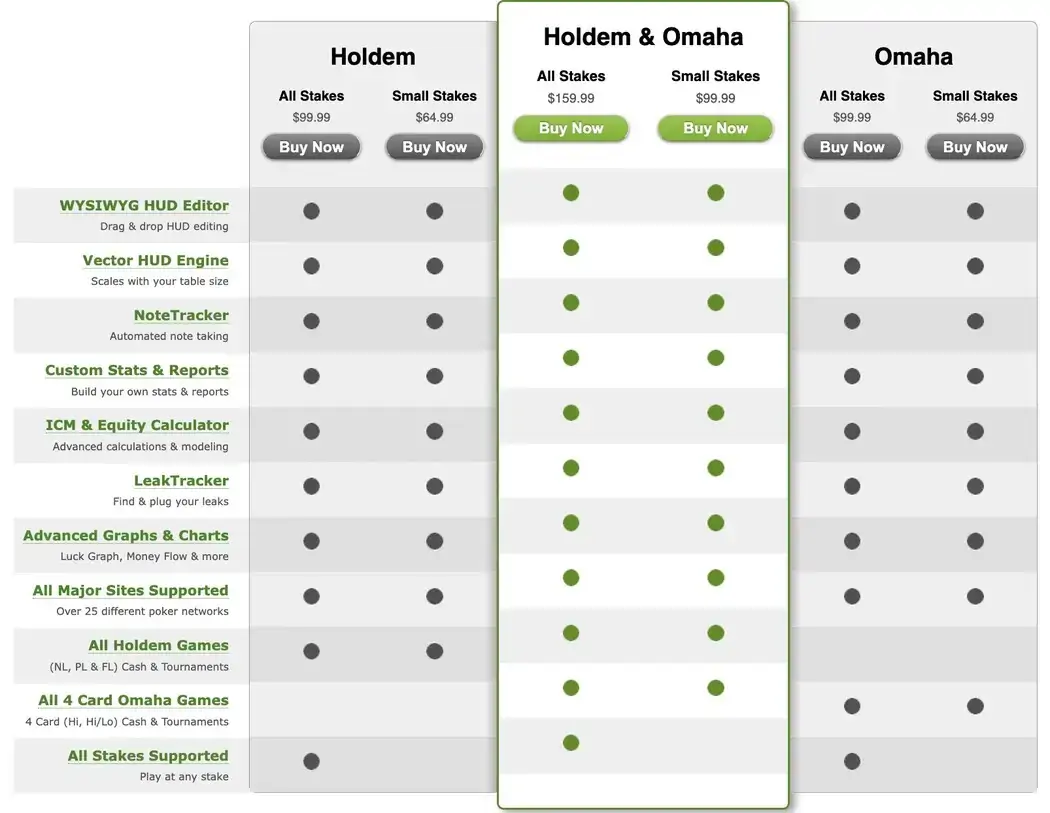

After the purchase, you will get a license code that can be activated on two computers. You can pay for the license through VISA, MasterCard, PayPal, Neteller, Discover and American Express.
How can I get PokerTracker 4 for free?
We offer you to download the program with a free trial period, lasting for 14 days. Each player can enable it during the setup. If you like the free version, you can buy the license for further usage.
💡Our hint: It is also possible to get a trial version for the Holdem discipline first, and then try the Omaha version for the same period. That is, each player can use PT4 for almost a month absolutely free.
PokerTracker 4 vs Holdem Manager 3
In essence, this poker program is an analogue and the main competitor of Holdem Manager 3. Although their functions are almost identical, distinctions also exist – check our comparison below.
| Aspect | PT4 | HM3 |
|---|---|---|
| UI | Data-heavy and technical | Intuitive interface with easy navigation |
| HUD | Vector HUD, flexible customisation options | Graphical HUD |
| Database | Uses PostgreSQL | Doesn’t require SQL installation |
| ICM & Equity Calculator | Available | Available |
| Leak finder | Built-in | Set as the additional module |
| Best for | Advanced analytics & customization | Practical for use with an easy setup |
| OS | Windows & MacOS | Windows only |
| Supported poker rooms | 42 | 26 |
Our Summary: PokerTracker 4 is a top-notch tool for grinders, applying a data-driven approach in their gameplay. Seasoned players will appreciate the advanced metrics and customisation options. Holdem Manager 3 is a perfect choice for those with less experience who want the information to be presented in a more accessible way.
Our View of Hits & Misses
Advantages:
- Less load on GPU and RAM when PT4 is running.
- Auxiliary modules are included in a standard package: NoteTracker, LeakTracker, ICM Calculator, ICM Quiz, and Table Tracker.
- Fully compatible with macOS devices (MacBook, iMac).
- Free period of use lasts for 14 days for each discipline.
- Free updates are released almost every month.
- One license code can be activated on two computers.
- PokerTracker 4 supports almost all poker rooms (42+ sites).
Disadvantages:
- Slow speed of hand import. The users who have several hundred thousand hands in their history usually face this problem when playing at 6-8 tables or more.
- Needs PostgreSQL. This software 4 requires installing a separate database for managing hand histories. It occupies the extra space on your device.
- Lacks mobile support. You can only use it when playing on a desktop since the native mobile version isn’t available
Rules for Using PokerTracker 4 in Poker Rooms
Poker Tracker 4 supports almost all poker sites that allow HUDs. The full list of sites where you can play using this software has 42 options.
888 client as well as PokerStars can work seamlessly. The app saves hands to your PC, and you can import these Hand Histories with PT4. Once the necessary hands are imported, they will be stored within PostgreSQL. Then, the hands will become available to analyze within your PT4 database.
When writing this PokerTracker 4 review, we identified that it no longer supports PartyPoker. Live HUD is impossible as well as post-session hand import.


#Ad 18+. Play Responsibly. UK first depositors only. Min. deposit: $10. Promo code: GET50. Bonus will be granted as tournament tickets gradually over 6 days and will expire after 24 hours. Full T&C apply. GamCare.org.


#Ad 18+ Full T&C apply. GambleAware.org. First time depositors only. Min. deposit £10 with code 'STARS400'. Play on any real money table on the site within 120 days after making eligible deposit. Bonus released in £5 instalments every 100 redemption points. No withdrawal during bonus period. Please play responsibly.


#Ad 18+ Full T&C apply. GambleAware. New UK players only; min £10 deposit; 100% up to £1,000 deposit bonus paid in cash. £50 Free Play in P$, Partypoker Tour Path & SPINS Overdrive tickets released over 6 days. 14-day ticket expiry.
If you still have doubts about whether you can use PT4, then check the full list of compatible rooms on the official website or send an email to the support service of the given poker room.
Our Verdict
If you already have a decent background in poker and aren’t afraid of managing a large amount of data, PokerTracker 4 is your must-have.
It’s an example of an application that can replace a variety of tools and add-ons. Customizable HUD, ICM, Equity Calculator, Leak Tracker and many other features are right at your fingertips. The interface may seem too complicated for beginners, but the advanced players will definitely appreciate the strategic depth provided.
FAQ
👤 Who should use PokerTracker 4?
Poker Tracker 4 isn’t the best choice for recreational players. On the contrary, those who play poker on a professional level find this tracking software really worthy. A large number of poker pros like Greg Merson and Nathan Williams, who constantly use this program, prove its usefulness.
💸 Does PokerTracker 4 show lifetime or session stats?
Yes, the software is capable of showing both stat types. In the live mode, players can only see the session stats displayed in the HUD overlay. To see and analyse the lifetime stats, one should go to the Reports tab, make a new one, and use filters to track one's long-term progress and key stats like Win Rate or BB/100.
🎯 Does Pokertracker 4 track fast-fold games?
Yes, it supports fast-fold poker formats like ZOOM (PokerStars), SNAP (888Poker), as well as other options. While the HUD overlay may not be supported for some fast tables, the software records your hand histories and calculates your performance to provide you with opportunities for post-session analysis.
💡 Can I use PokerTracker 4 on Mac and Linux?
MacOS owners are lucky to have the native support. There’s a native version of the software for Apple devices like the iMac and MacBook. Unfortunately, the version for Linux isn’t available. However, compatibility layers and emulators still make the experience possible.
📌Can I import hands from GGPoker into PokerTracker 4?
GGPoker prohibits PT4 and similar third-party tracking software. But it’s still possible to import the hand history through PokerCraft, the GG’s standalone analytics app. Download the file on your computer and import it to PT4 via the Get Hands from Disk function under the Play Poker tab.








Please, login or register.