
Equilab: Top Equity Calculator Review
Equilab, a powerful tool for calculating one’s equity against rivals on each street, is not a new thing on the market. Our complete Equilab review reveals the full functionality this software offers, how free and paid plans differ, how it can help level up your skills, who it suits and what its major drawbacks are.
What is Equilab Software?
This is a heavy-duty poker program created by the portal PokerStrategy. It lets everyone calculate the probability of winning the pot (equity) in Texas Holdem and Omaha poker games. The analysis is based on the provided parameters: your hand, board, and the range you assign to your opponent.
It is an extremely useful tool for all users, especially newbies – the basic version is totally free (the advanced requires a payment, though). It belongs to the category of poker software which UK players should get familiar with, starting from the lowest limits.
Equilab is disallowed during gameplay – only meant for parsing hands after the session is over.
Although it is an effective study tool, poker rooms typically forbid this software while the client is running or fully. Your account may be blocked if the operator detects such activity from your IP address.
Equilab Poker Tool Capabilities
This application combines multiple useful features for inexperienced, intermediate and seasoned punters. Let’s discuss them, moving from major to supplementary ones.
Core Functionality of Equilab
- Equity calculation tool. Assigns hand ranges and shows your equity vs six or ten opponents in real-time. Particular cards may be set instead of spectrums.
- Scenario analyzer. With it, punters learn how cards arriving on the turn change equity percentages. One click, and the results appear in front of the person instantly.
- Equity trainer. Helps users sharpen their ability to assess winning chances against various ranges, up to nine per run. The training works for any round from preflop to river, depending on whether you want to include board cards.
Additional Free Features
There are a few more Equilab features worth highlighting and discussing:
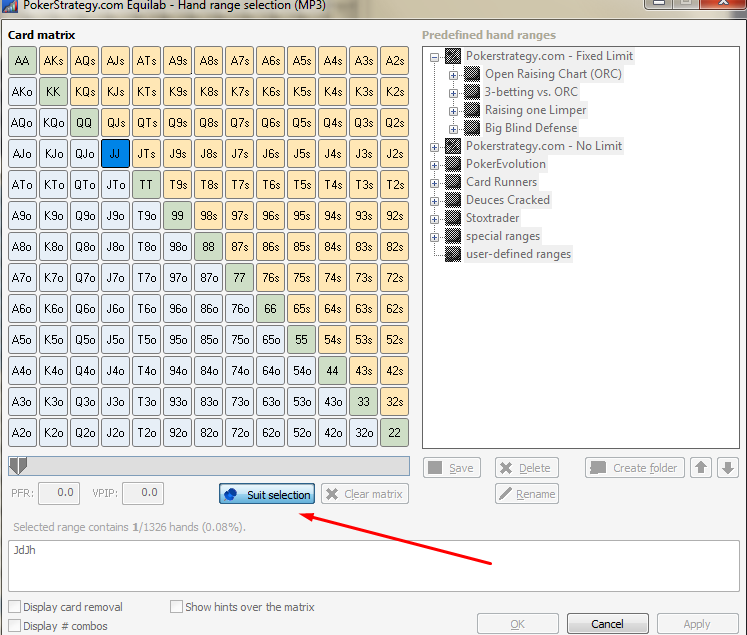
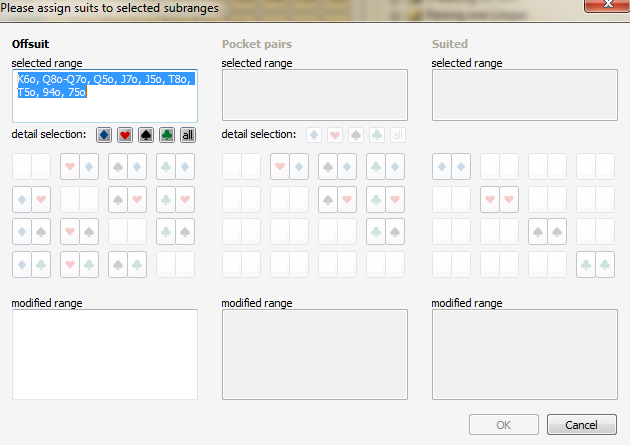
- Specific suit selection. The feature is super handy if you aim to analyse suited hands in the foe’s range, say, diamonds or clubs, and no others. This narrowing makes the calculation even more precise.
- Flop hit analysis. This function promptly reveals how the villain’s range connects to the flop you set out. Visually, it looks like a pie chart – simple and very informative. Click a diagram icon next to the opponent’s range field to open and see it.
- Pre-built range library. These are templates of opponent ranges created from typical actions, for example, 3-bet vs raise. Such predefined spots are excellent starting points for beginners to practice and perfect their play.
Equilab Compatibility
- Windows. Yes, officially launched.
- MacOS. Unavailable for native use, only works through emulators.
- Android/iOS. Not accessible on mobile devices.
How to Use the Equilab App for Equity Estimation
The program's functionality is displayed in a single window. There, you should specify parameters for calculating equity:
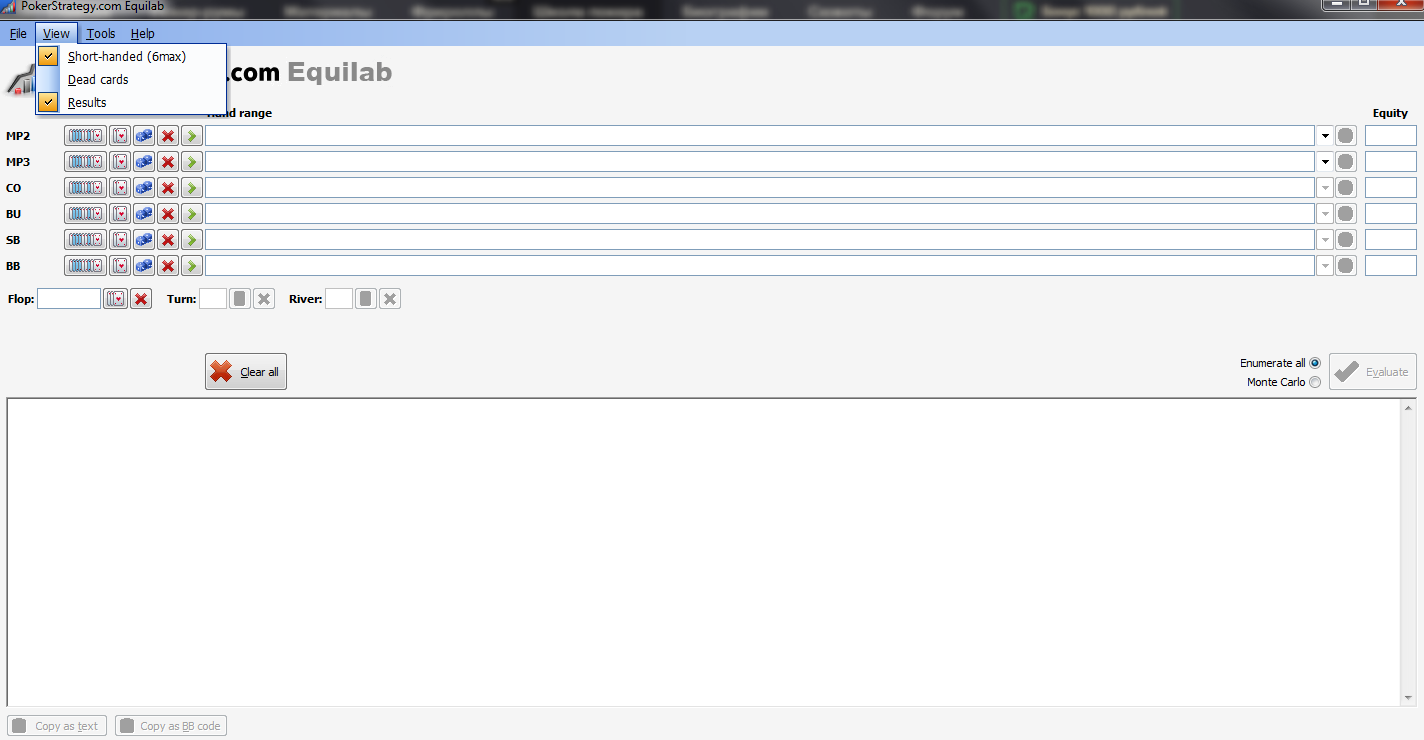
- Choose the table type according to the number of seats – 10-max or 6-max. In order to select 6-max, you should check the “short-handed (6-max)” box in the “View” tab:
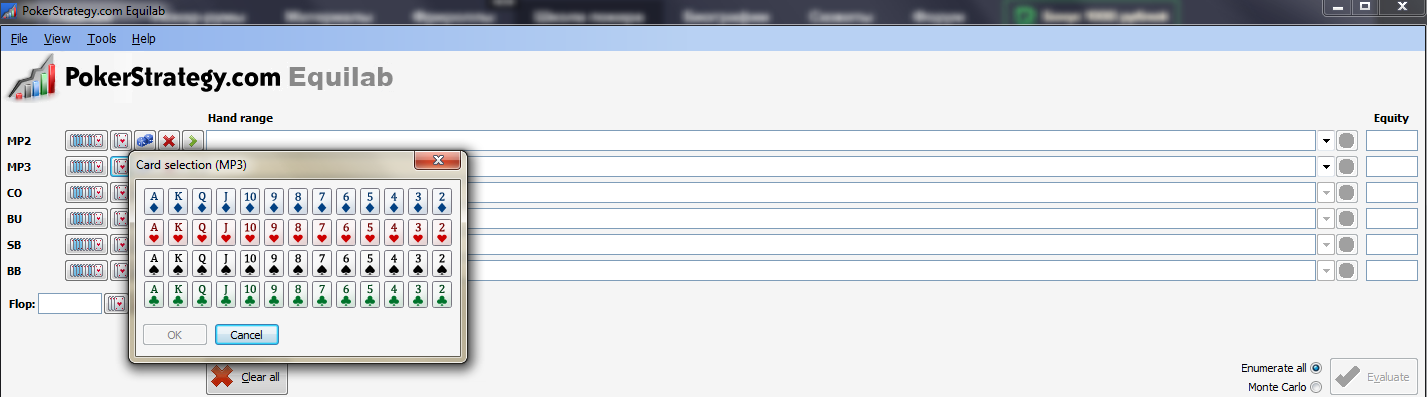
Next, specify pocket cards for two or more opponents. You can select both particular cards and a range of hands:
- By clicking the blocks (the button near two cards), you will select a random range for a player. Thus, the equity will be calculated for two random cards:
- It is not necessary to indicate the board (flop, turn, river), but the equity will be estimated more correctly if it is specified. You may not input community cards at all, or you can set the cards up to a certain street (flop or flop + turn), or you can indicate the entire board (up to the river).
- You can select the player’s action by clicking the green arrow:
- After filling in all the necessary Equilab fields, press the "Calculate" button to get the result.
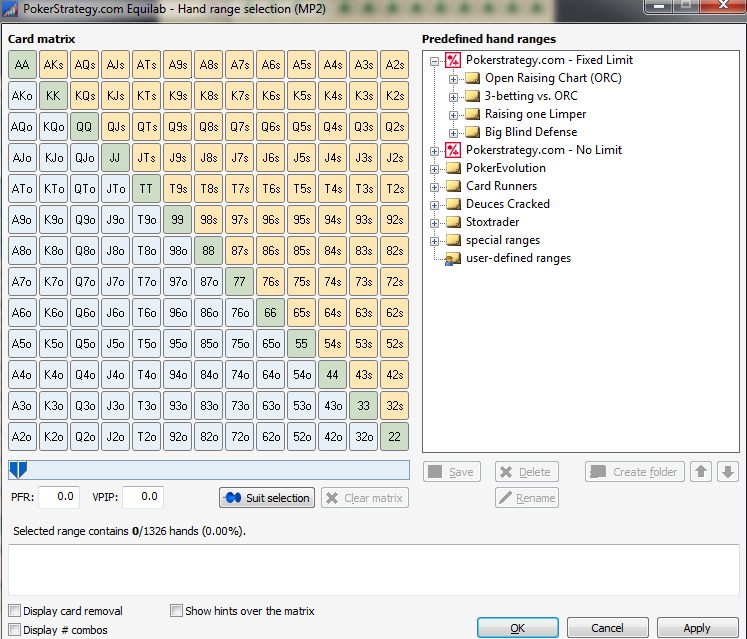
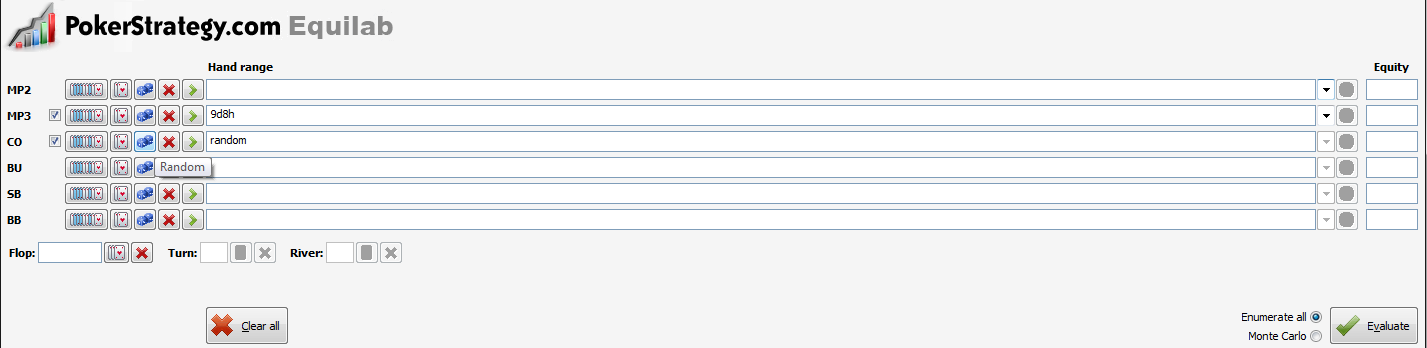
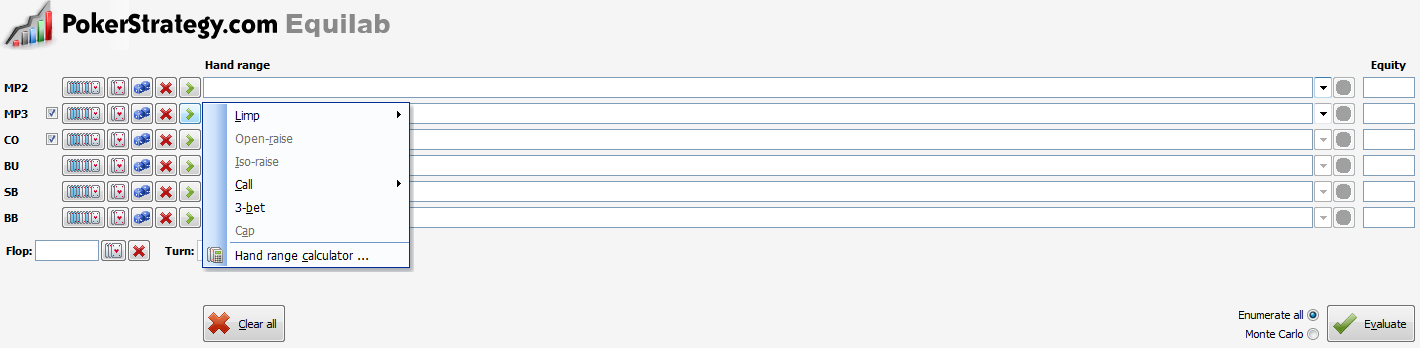
💡 Handy hint: Hold down CTRL to cover multiple choices at once. If you click, say, on 10x10x, the system will automatically select all pocket pairs from tens to aces. The same logic applies to other hands in the matrix.
Breakdown of Equity Calculator Methods
There are two ways (methods) to calculate winning probability:
- Enumerate all – it is a mathematical-numerical method.
- Monte Carlo – this method generates an infinite number of hands to assess the probability.
Poker players use the first method by default.
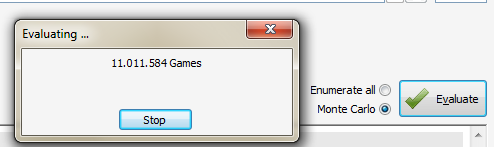
However, when pressing the "Enumerate all" button, the following inscription sometimes appears: "It is interrupted! Enumerate all equity is inaccurate. Please, use Monte Carlo".
In this case, you should use the second method, namely "Monte Carlo":
Determining Your Hand Strength
Equilab also shows how a certain hand hits the board, i.e. what chances you have for making one or another combination. To do this, click on the diagram icon:

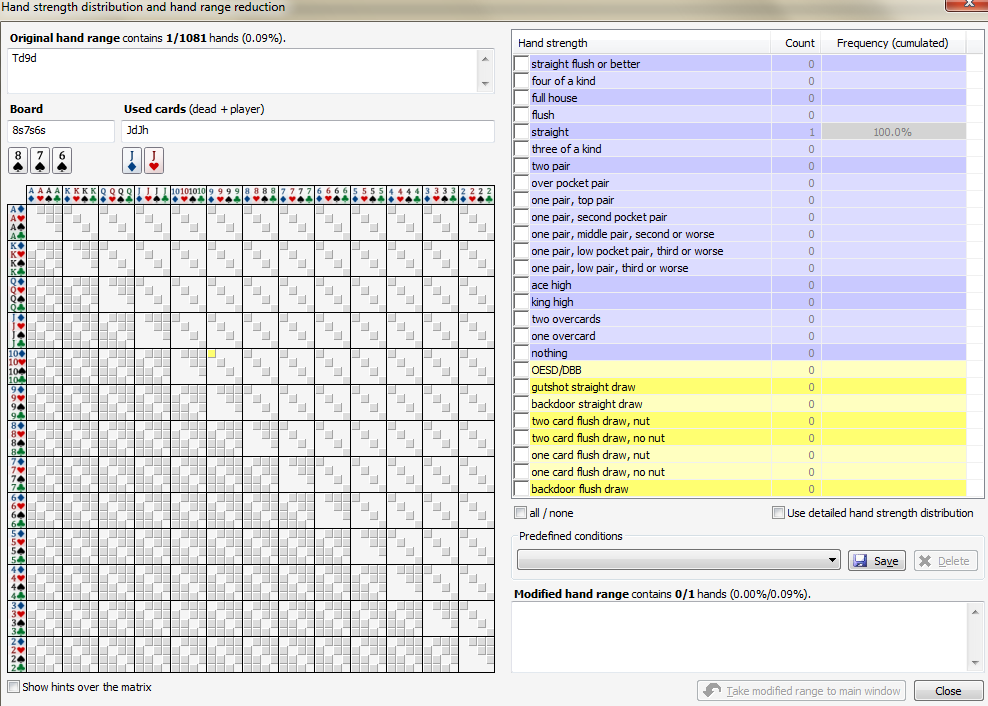
Additionally, people have the option to select a specific suit of player cards. If the flop contains two suited elements, then you can parse your rival’s holding if their pocket cards are of the same suit. To do this, follow the photo instructions below:
If you need to calculate hand odds in an online game, our poker calculator is the ideal choice for you.
Equity Trainer for Regular Practice
You have an opportunity to practice your equity knowledge. To do so, choose "Settings"/"Equity trainer" in the software lobby. You will be presented with two choices: guessing equity for random cards or selecting cards for both yourself (Hero) and your foe (Villain).
If you pick "predefined", you will also need to select the specific situation that the Equilab app will simulate:
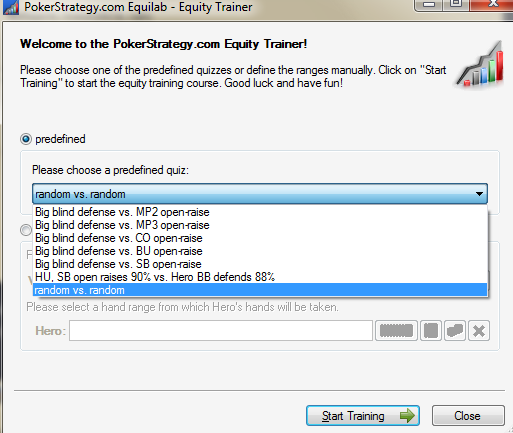
So, if you've chosen one of the "predefined" options, then you will be randomly offered flop and Hero cards, and your task is to approximately calculate the cards’ equity:
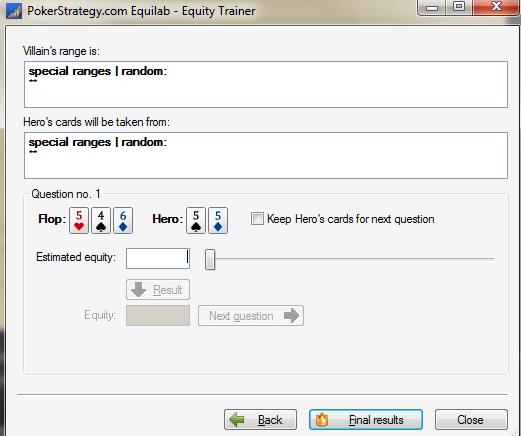
Well, it is a fascinating feature. Use it to test your understanding of hand equity values for specific flops. And keep in mind that the more you practice such calculations outside of the actual game, the easier it will be for you to assess various spots when you are seated at the tables.
How the Scenario Analyzer Tool Works in Equilab
Now, let’s see how to use Equilb as a scenario simulation app. This indispensable feature demonstrates how the turn or river can change your equity on the flop. In other words, you will see which card becomes dangerous for you and force you to make the right decision – fold, or vice versa – bet /call if the card improves your low equity.
In order to open the "decision analyzer", you should select the "Settings" tab in the app’s lobby.
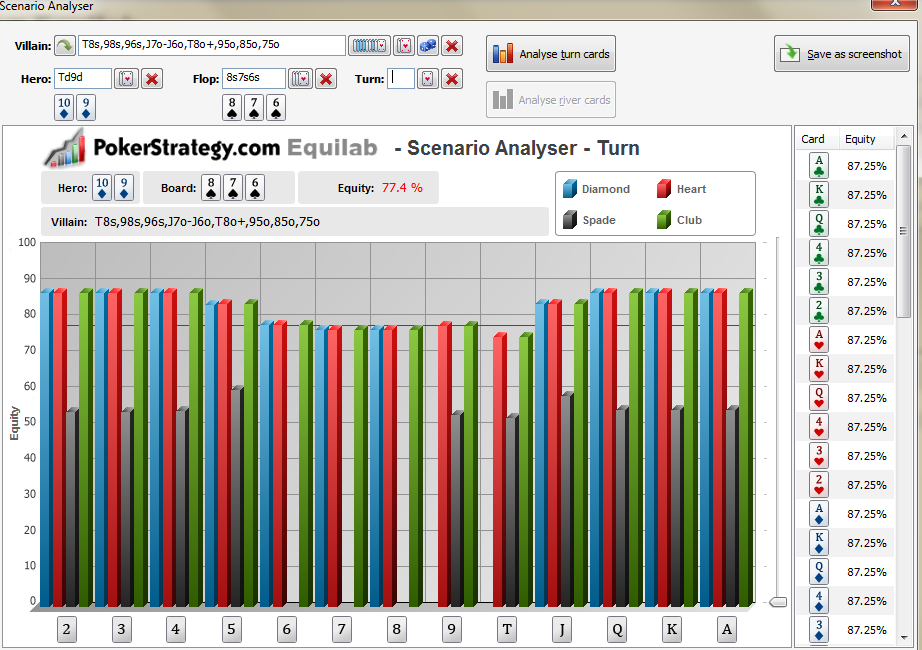
In the picture above, you can also notice a slider circled in red. This is the win percentage regulator. With its help, you can set the minimum value of your equity that you deem necessary.
Differences Between Free and Paid Plans
| Feature | Free plan | Power Equilab |
|---|---|---|
| Equity estimation | Hand vs range, range vs range | + Advanced calculations |
| Predefined ranges | Basic | Basic + weighted |
| Heatmaps | N/A | Graphical range strength |
| Pie charts | Analysis of hitting flop only | Detailed |
| Equity drill tool | N/A | Full access to training mode |
| Dead cards | N/A | Specific cards may be excluded |
| Multiway pots | Limited | No restrictions |
| Hand history import | N/A | Most UK platforms supported |
How Much Does Equilab Poker Software Cost in 2026?
The Power edition will run you from $3.49/month, so that’s around $42/year. A free trial version functions for the first 14 days, so you have an opportunity to test advanced features before you start paying for them.
Equilab Hits and Misses in Our View
Check out the quick pros and cons to understand whether the tool will work for you, or better search for something else. Among its prime advantages, we'll allocate:
- Graphical interface. Intuitive charts and visual outputs make information much more comprehensible, which benefits absolute novices.
- Improves poker tactics. By knowing range strengths and how specific cards work against villains, the decision between fold, call or raise will be less challenging and closer to optimal.
- Covers all skill levels. Both beginners and pros will find it effective. If you’re at the start, this is a great foothold for learning and training to do equity estimation. Experienced players customise for specific spots and work on their leaks.
- Versatility. The software has extensive functionality for studying hands you’ve played not only at Holdem but also at Omaha tables.
- Free version. A basic version of the app for poker Equilab doesn’t cost a penny, but it still offers multiple features under one account. E.g., calculating winning probability, running simulators, etc.
Now, let’s discuss Equilab limitations:
- Only works for 6-max/10-max tables. No 2-max or intermediate sizes, this software supports these two formats, and no others.
- Post-game analysis only. Most operators prohibit its use during active play and may ban your account for breaking the restriction.
- No mobile support. Those who prefer to play poker on smartphones and tablets are out of the accessibility circle.
- Doesn’t work on macOS directly. Emulation software is necessary to launch the program on an Apple desktop/laptop.
Looking for a Mac-compatible equity calculator? Consider PokerTracker 4 – it has a macOS version and offers a tool for calculating equity. It’s built into the PT4 software and does all the same things as the application being discussed.
Professional Opinion on Equilab
Famous cash game player and poker coach Nathan "BlackRain79" Williams believes that this is one of the best equity calculators.
![Nathan Williams]() Nathan WilliamsSuccessful poker player and coach
Nathan WilliamsSuccessful poker player and coach“The poker tool that I have used extensively over the years is Equilab. This is a great little equity analysis tool that allows you to plug in specific hands and community cards and get the exact odds. The reason why it has been so popular over the years (and continues to be even when there are many more advanced free and paid equity analysis tools out there) is its simplicity.”

Where Equilab is Allowed and Prohibited
It is prohibited to use the app while playing in the vast majority of online poker rooms. Why? Because it provides the punter with an unfair advantage over other foes.
- 888. This operator does not allow launching Equilab poker calculator while tables are open.
- PartyPoker. Disallowed when the client program is open. If a person violates this rule, the room reserves the right to permanently ban their account and even confiscate funds.
- GGPoker. No analysis tools are permitted during gameplay, except for native PokerCraft.
- PokerStars. Detects the discussed application only when the game client is running. When you are not playing, you can utilize it and other third-party software without any issues.


#Ad 18+ Full T&C apply. GambleAware. UK first depositors only. Min. deposit: $10. Promo code: GET50. Bonus will be granted as tournament tickets gradually over 6 days and will expire after 24 hours. Full T&C apply


#Ad 18+ Full T&C apply. GambleAware. New UK players only; min £10 deposit; 100% up to £1,000 deposit bonus paid in cash. £50 Free Play in P$, Partypoker Tour Path & SPINS Overdrive tickets released over 6 days. 14-day ticket expiry.


#Ad 18+ Full T&C apply. GambleAware. First time depositors only. Min deposit $10. Select 'Match Bonus' in cashier. Max bonus $600. Bonus released in $1 increment per $5 paid in net rake/tournament fees. 90 days after eligible first deposit to unlock full bonus. Withdrawal restrictions apply. Up to 50% Rakeback for new players until 30.04, as newcomers skip straight to Octopus status in Ocean Rewards.

#Ad 18+ Full T&C apply. GambleAware.org. First time depositors only. Min. deposit £10 with code 'STARS400'. Play on any real money table on the site within 120 days after making eligible deposit. Bonus released in £5 instalments every 100 redemption points. No withdrawal during bonus period. Please play responsibly.
If you prefer mobile play, consider our top poker app picks for a safe and seamless experience.
Cardmates Verdict on Equilab
This tool isn’t the most advanced, but it includes many effective features to help refine basic skills and jump from an intermediate to a pro level.
Equilab will benefit both beginners and professional players – it is a must-have tool on the road to success in poker.
By reading our review, you now know how to estimate your equity, but the more you practice outside the table, the more comfortable it will be to analyse different spots and make optimal decisions during real gameplay. You will feel more confident in deciding whether it’s better to bet or fold your cards.
FAQ
🎯 Is there a free version of Equilab?
Yes, UK players can download Equilab at zero cost, install it on their Windows computer, and utilize it for their situation. To get the free basic version, you only need to complete a simple requirement – sign up with PokerStrategy. However, the developer’s official website may be unavailable for certain countries.
🧩 Is this equity calculator suitable for beginners?
Yes, this program is suitable for novice players. It has a user-friendly interface, so you will face no complex setup. Diagrams and pie charts make any information more comprehensible. Training simulations help train equity intuition. Plus, no barriers to entry because the basic plan is free.
📊 Does Equilab support range vs range analysis?
Yes, Equilab supports this calculation pattern. To get it, the punter should input their and the foe’s range, the board and then the program will display equity for all matchups. Comprehensible pie charts break down your strengths. It’s advisable to use the Monte Carlo system for better accuracy.
💻 Is Equilab download available for Mac users?
No. Equilab is not Mac-compatible, so you cannot download and natively use it on your personal computers from Apple Inc. However, if you have a Windows emulator, indirect use is possible.






Please, login or register.