
StarsCaption Review – All About Helper Software for PokerStars
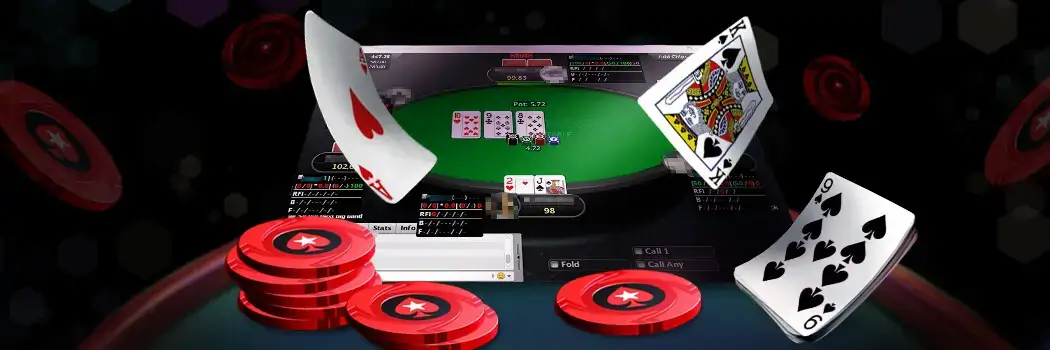
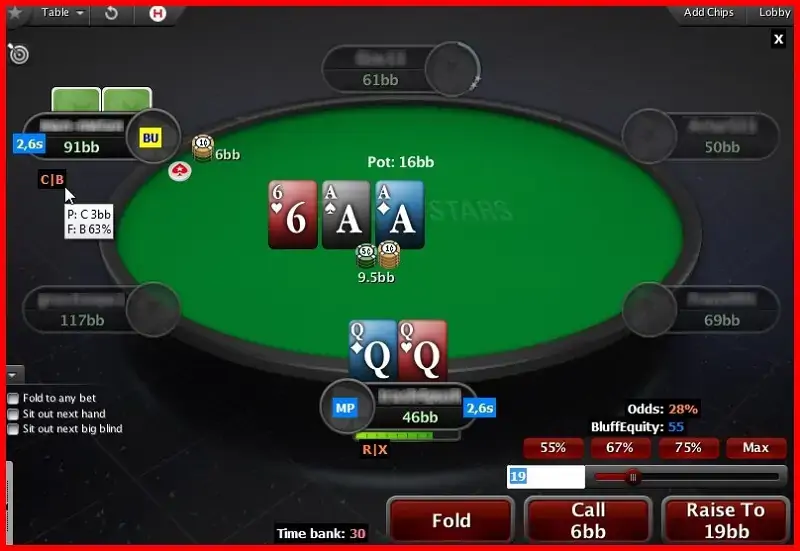
StarsCaption poker tool from the Caption series has been designed to improve your game on PokerStars. It’s an assistant that upgrades the interface and adds the functionality the default poker room interface lacks: hotkeys, custom HUD, betscripts, automatic reply to pop-ups, etc.
Our Stars Caption review reveals the key functions this software has, guides how to set up the TL tags, explores the differences between paid and free plans, as well as the hits and major misses.
StarsCaption Functionality
StarsCaption main task is to create a more comfortable experience rather than calculate the statistics or spot leaks.
Let’s review the core features this tool has to enhance PokerStars interface and improve the gameplay quality.

- Assign a specific bet sizing for every game situation. You will only need to press "bet" while playing to apply the previously defined bet size. If you want to change the amount, do it anytime.
- Set the basic shortcuts like I’m back, Stack tables, Sit out next to BB.

- Bet, raise, fold, etc.
- Exit the table on BB
- Sit out next hand
- In the game
- Fold to any bet
- Close the table, etc.

It allows people to display Stack-to-Pot Ratio (SPR), pot odds & size, ITM, stack size etc. HUDs give information about the rival’s origin, time bank, as well as the tournament details. To enhance usability, differences in stats can be displayed by changing colour-coded cues.

- Automatically press "back in the game".
- Zoom in on mouse hover.
- Enable Auto time bank.
- Show stack sizes, bets and pot amounts in big blinds.
- Adjust the view to eliminate unnecessary elements.
- Auto-closing of dialogue pop-ups.
- Customization of table arrangement for multi-tabling.
- Set the mouse wheel for bet sizing adjustment.
You can study the guide on how to set up this utility in our 888Caption review – all processes are virtually identical for both programs (as they are for PartyCaption).
This bunch of tools is useful for both tournament players and cash table punters. With so many automation options, participants can save time, get distracted less frequently, and stay involved in the action.
How to Configure TL Tags
Here is a short video tutorial on how to properly set up tags and display the values from the tournament lobby on the table.

SC is compatible with any PokerStars layouts; no preliminary configuration is needed (although you may need to restart the utility after changing layouts in the client settings).
StarsCaption Download & Pricing
You may download this software without worries, as it’s in the list of approved software for PokerStars. It was previously used on Full Tilt Poker, but it’s now shut down. This program is permitted as it provides no statistical information or advantage to players.
It’s necessary to purchase the license to explore the tool’s features without restrictions. A 1-year access will cost you $24.Download StarsCaption and get a convenient utility at your disposal.
StarsCaption Free Version & Trial Compared
The free version of Stars Caption only fits low-stakes players: NLH tables up to $10, and tournaments with buy-ins up to $3.
There’s an automatic detection of the active table. If you try to launch the caption with higher stakes, it closes without any prior warning to the user.
But there’s still a way to test the program at higher stakes, not paying for a license. See how you can do it:
- Install & launch the software on your PC.
- Sign in to your profile.
- Click the Request for Trial button.
- Enjoy discovering the tool for 30 days.
On the trial expiry, you’ll return to playing at a limited stake.
Our View of Hits & Misses
- Fits both the rookies and the seasoned players.
- Advanced HUD covers a lot of the general and tournament information.
- It’s the trial mode comes with stake restrictions.
- The tool is fully compatible with the Aurora graphics framework of PokerStars.
- It can work simultaneously with Hand2Note.
- Operates only with the English interface.
- The free version is limited to cash tables at stakes not more than NL10 and tournaments with entry fees up to $3.
- It’s only suitable for Windows users – MacOS isn’t supported.




#Ad 18+ Full T&C apply. GambleAware.org. First time depositors only. Min. deposit £10 with code 'STARS400'. Play on any real money table on the site within 120 days after making eligible deposit. Bonus released in £5 instalments every 100 redemption points. No withdrawal during bonus period. Please play responsibly.
Our Verdict on StarsCaption
The set of features StarsCaption brings to the table will appeal to regular players as well as seasoned grinders. I
ts user-friendly interface allows you to apply the desired changes in minutes to get the upgraded visuals and stay focused on the gameplay. The program we reviewed can provide great assistance, but only while playing on PokerStars. You can test-drive it free of charge and, perhaps, your game would never be the same again.
FAQ
💁♂️ What is Stars Caption?
This software is designed specifically for PokerStars and formerly for FullTilt (which is now closed). Poker players can use it to simplify and automate the game process, but not for learning and analysis purposes, like calculating equity or winning odds. SC is compatible with all regional domains. Run it alongside the client software with the only restriction – English interface.
📊 Does StarsCaption support the Aurora engine?
Yes, it fully supports the Aurora engine with updated graphics. StarsCaption was released to replace the outdated StarsHelper, which was incompatible with the new framework. The upgraded software works well with all current PokerStars clients. It's not necessary to make the additional configuration changes.
❓ Can I set up hotkeys for StarsCaption?
Yes, you can assign StarsCaption hotkeys to cover in-game moves and basic actions. With these hotkeys activated, players don't need to waste time pressing buttons with the mouse. Set a specific action, like bet, raise, or fold, to a keyboard button and make actions with one click.
💰 Which stakes qualify for the free version of StarsCaption?
The free version of the software supports playing at micro stakes. The maximum buy-in for No Limit Hold’em cash tables is $10, while tournament players can only buy in for $3 or less. The program closes automatically if it detects an attempt to enter the table with higher stakes.




Please, login or register.