
Holdem Manager 2 Review – Why You Shouldn’t Try to Download HM2
Holdem Manager 2 is a poker tool for collecting and displaying statistics of past games to work on mistakes after sessions. It also supports HUDs for real-time stats on opponents. This expert review examines the software in detail, covering the key functions, HUD stats and the benefits of additional modules.
UPD: Developers of Holdem Manager 2 stopped updating it in 2020, so it’s necessary to upgrade to Holdem Manager 3. The outdated version is incompatible with the upgraded poker clients. While you still may launch it and connect to the selected poker room, you’ll face lags and stuttering. Avoid downloading the previous version from third-party sites, as you may install malware.
What is Holdem Manager 2?
HM2 is a professional tool for tracking poker hands and post-session analysis. It also has a built-in equity calculator. Those who need richer functionality may install additional software, like Notecaddy or LeakExplorer.
With Holdem Manager 2, you can watch previous results, analyse your performance, and find leaks in your game.
It hit the market in 2011 and was a breakthrough, giving players much more information about an opponent than they had before. With the help of the tool, you will see the rivals right through.
Holdem Manager 2 Features
The software has a huge arsenal of tools for analysing your game results. Players access the key functions of HM2 via the tabs at the top of the app window. Discover the functions that become available after installation:
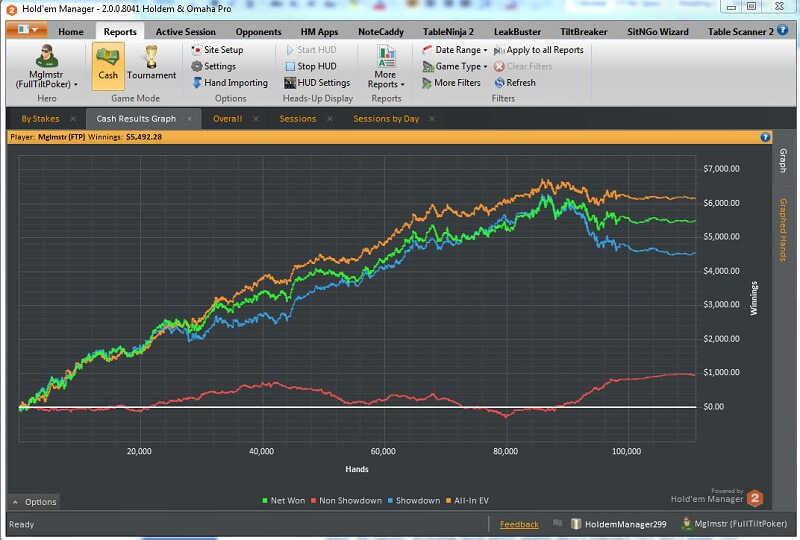
- Reports. This tab stores the history of past games. With the help of filters, you can sort the hands by any given parameter (positions, actions, etc.). The Cash Graph function allows you to track your results over time. When you click on a Cash Graph Results tab, you will see a chart with several lines of different colors.
- Green line is your total profit (an average value of the blue and red lines).
- Blue line is your profit with WTSD only.
- Red line is the profit without WTSD.
- Yellow line is the profit line with EV.
- Opponents. A tab of “Opponents” contains information about all the players you have played with. You can apply filters to get more specific information about your rivals, like preflop line or position filters. The Player Analysis feature allows you to discover the hand ranges of your rivals and their playing style.
- Active Session. It is a tab where you can analyse your game sessions (both cash game results and tournament performance). You can reproduce any hand with the help of Hand Replayer. Active Session gives insights into the best hole cards you had.
- HM Apps. The remaining tabs depict the auxiliary software you’ve installed. Among the most popular options are NoteCaddy, Range Wizard, LeakBuster, etc.
Holdem Manager 2 HUD at a Glance
This is how HUD in HM2 looks during the game:
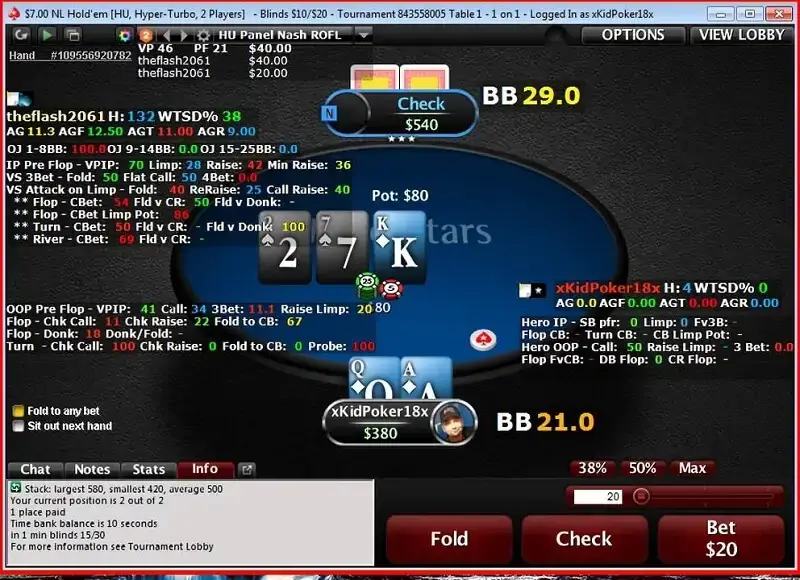
The main stats of the opponents are displayed next to them (statistical indicators on many parameters). When you point at them with a mouse, a pop-up with more detailed stats appears.
HM2 HUD Settings & Customization
The overlay in Holdem Manager 2 comes in several default options. But you can customize it according to your preferences. Here are the key overlay options you may adjust:
- HUD Designer. Allows you to select the specific stats to depict (VPIP, Total Hands, Postflop Aggression Factor, Squeeze, 3Bet, etc).
- Stat appearance. This field applies individual settings to each stat (colour range, abbreviation, font, popup, etc.).
- General settings. In this tab, players can set up the general settings, adjust HUD opacity, lock the layout, and apply more advanced options.
- Site options. This is where you can attach a customized HUD profile to a selected poker room.
- Popup & chart designer. It allows users to create new popups and Percentile ranking charts as well as adjust how they’ll look.
- HUD Filters. On this tab, grinders can apply HUD filters to cash tables: by player quantity, by the number of hands, by limits, etc
Basic Stats in HM2 – What You Get?
To figure out the HUD, first you need to understand what each indicator displays. There are a lot of them. Let's look at the main ones:
- VPIP (voluntarily put money into the pot) – a percentage of game entries on the preflop (except for the game on positions of SB and BB). This indicator will let us know whether a loose or tight player is in front of us. VPIP of good players doesn’t exceed 25%. The lower the VPIP is, the narrower the range of the player's hands is.
- PFR (preflop raise) – a percentage of a preflop raise. This indicator will help understand what range of hands an opponent may have. The indicator of 7-13% is considered normal.
- AF (aggression factor) – it is calculated by the following formula: (% bet +% raise) /% call (the amount of bet and raise percentages needs to be divided by a percentage of the call). Passive players often slowplay with good hands, but aggressors, on the other hand, bet on draws and medium hands actively. An average value of AF on the flop and turn is 2-3.5. The river value is 1.6-2.5. Many professionals believe that a profitable game is an aggressive one.
- WTSD (went to showdown) – a percentage of the player's hands that reach the showdown. If the indicator is high, then the player doesn’t muck even the weakest pair. Conversely, if WTSD is too low, then the player mucks medium and weak hands. The average WTSD is 27-38% (10-max), 35-38% (6-max).
Additional Stats to Explore
VPIP, PFR, AF and WTSD are the main indicators, but HUD in the Holdem Manager 2 supports many other stats besides them:
- ATS (Attempt to steal) – an indicator of how often a player steals blinds using a profitable position.
- 3B (3-bet) – a percentage of preflop 3-bet.
- CB, c-bet, cbet (Continuation Bet) – a percentage of how often a player makes a continuation bet. If you know the percentage of Cbet, it will be easier for you to understand the rival’s intention. It may be an attempt to take a pot without having a strong hand, or whether he really has a powerful draw or a made combination. Obviously, if the value of a player's CB is close to 100%, then he is either too lucky and always hits the flop, or he just bluffs and bets a barrel (that is more likely).
- Hands – a number of hands that have been analyzed to get the statistics. The higher the indicator is, the more perception we have about the poker player’s manner. It is worth noting that the stats must be the latest, so use data from the last two months maximum.
- FoldvCB – a percentage of fold versus continuation bet.
- Foldv3B – a percentage of fold versus 3-bet.
- FoldvTurnCB – a percentage of fold versus the continuation bet on the turn.
- W$@SD (Won $ at Showdown) - percentage of the winning showdowns (an average number of showdowns that player wins in %).
You can find a lot of other stats and terms in our poker terms dictionary.
Additional Apps for Enhanced Experience
To broaden the range of the main functions of HM2, it is possible to connect additional modules:
- Leak Buster. It will help you to find the leaks (mistakes) in your game.
- Table Scanner 2. It analyses the tables for searching for the "profitable" ones (bumhunting).
- SitNGo Wizard 2. It’s useful for making optimal decisions in MTT and SNG at the late stages.
- Note Caddy. It makes notes on the players automatically.
- Tilt Breaker. It closes a game session when you start to play poorly or go on tilt.
- Table Ninja 2. It automates your actions during multi-tabling and simplifies the implementation of actions.
Holdem Manager 2 Price
Punters could download a full version for free and use it for 30 days, then they had to buy a license.
The cost of a license for the full version of the program for playing Texas Hold'em was $100. Holdem Manager 2 download for playing Hold'em and Omaha disciplines cost $160. The manufacturer also offered a discount version for small bets.
Hits & Misses
- Powerful HUD with plenty of customization options.
- Convenient tracking through reports and graphs.
- One-time purchase unlocks lifetime access to all features.
- Additional apps expand the range of software features (note-taking, multi-tabling automation, etc).
- It has not received updates since 2020.
- Relies on PostgreSQL database and is thus resource-heavy.
- Incompatible with the updated poker clients.
Holdem Manager 2 Supported Sites
British punters could play with this software in many licensed poker rooms. The most popular of these are the following:
All leading poker rooms have upgraded their software quite a while ago, so HM2 is no longer compatible with their clients. To keep benefiting from this software at cash tables and tournaments, it’s necessary to install the latest version.
Cardmates Verdict
Holdem Manager 2 is outdated software that is incompatible with modern poker clients.
There’s no point in downloading this tool – it no longer receives updates and technical support from the developer. The poker client software has changed a lot since 2020, so there’s a very low chance that HUDs, hand history tracking, and other features will work fine.
FAQ
🎯 Does Holdem Manager 2 still work?
All updates and technical support ended in 2020. Players who have the installed software can still launch it. However, hand importing, HUD, and other functionality will hardly work correctly in the upgraded poker clients.
⌛ Can I still activate my old Holdem Manager 2 license in 2026?
There’s no specific information on whether it’s possible to activate the old code or not. The software is likely to accept your pre-owned license. But since the tool receives no updates, using the outdated version makes no sense. Upgrade to the newer release.
⬆️ Will I lose my HM2 hand histories after upgrade to HM3?
No, you’ll be able to import the hand histories from the previous version during the upgrade to HM3. It’ll be possible to start the migration of data to Holdem Manager 3 during the installation process or import the file later.
💡 What is the best alternative to Holdem Manager 2?
If you’re used to the Holdem Manager 2 interface, upgrade to the 3rd version. Players who need multiple HUD options with customization will find Hand2Note useful. Poker Tracker 4 is an alternative solution for those seeking detailed stats for thorough game analysis.







Please, login or register.