
PokerStove Equity Calculator Review

PokerStove is a free app for calculating equity in Texas Hold'em. The software will show you how well your hole cards stand against your opponent's hand/range. In this review, we go over the software’s functionality and its legality, explain how to use it and where to download it for desktop. Find out the major pros and cons, as well as the top alternative solutions to compute winning chances quickly.
What is PokerStove?
This is a free calculator which poker players use to assess their chances of winning against another hand or a whole range of hands. The punter simply inputs known pocket and community cards to calculate their equity for preflop, flop, turn and river.
Andrew Prock developed PokerStove in 2002, and it was a powerful piece of poker software for the next decade.
UK punters can utilise it legally off-table when all poker clients are closed. We contacted the support teams of popular platforms and were warned that the program must not be running in the background. If the gaming software and the calculator are both active, even when you do not make any analysis, anti-fraud systems will count it as a violation.
Why Use PokerStove?
- For a beginner. This is a great opportunity to understand which starters have the most potential and how their value changes depending on the number of people at the table.
- For an experienced player. It is useful when parsing your own game to identify leaks. By calculating probabilities for hands played, you can see whether you acted correctly or entered the action with cards having a low chance of victory.
PokerStove Functionality
Every player who relies not just on luck always employs poker math fundamentals and the theory of probabilities to calculate potential winnings. The discussed app can simultaneously store information about ten players, thus enabling probability analysis on both full and short-handed tables.
The software interface operates based on data provided by the user: pocket, community and mucked cards. One can also indicate opponents’ cards/ranges for more precise results.
Everything is pretty simple – you indicate users’ cards and board, and then you receive equity for all participants for every street.
Instructions on How to Use PokerStove
There is a list of participants (Player 1, Player 2, etc.) in the application lobby.

To select the cards of user 1, click on the inscription “Player 1”. You will see a new window with two tabs. In the first tab, you can specify your or your opponent’s cards if you know them for some reason. In the "Preflop" tab, you can set a supposed hand range for a specific individual. At the bottom right, you can also select the combo of suits you want to exclude. To do this, click on the combinations you don't need.

Click on the “RD” (random) button next to the "Player X" label to provide statistics for a random hand for that player.

Once you're done, click "Evaluate" to evaluate equity for each participant.
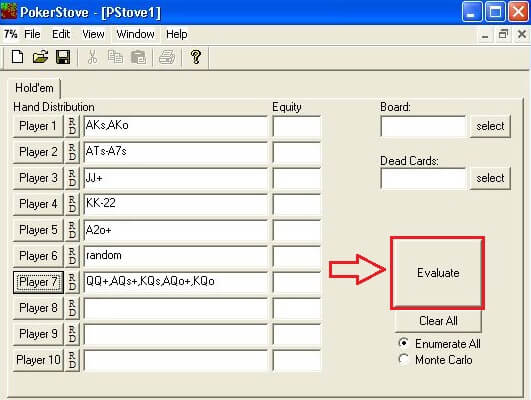
In the "Dead Cards" section, you can specify mucked cards which became known for some reason (e.g., if the player has mucked the cards face-up).
As you can see, Poker Stove is very easy to adjust for most situations you will encounter. By dedicating proper attention to working with this program, you will greatly enhance your hand reading skills. Should you want to understand its operation in more detail, consider watching the following video:
Sample Scenarios
Depending on the accuracy and amount of information input, the program generates the Expected Value and helps determine the likelihood of winning under various scenarios. These include:
Hand vs Hand (Preflop). Calculate hand strength when most cards are in the deck. Your cards: AJs, the opponent’s ones: KQs. For you, the chance of winning the hand is 59%, while your rival has only 41% equity.
1 Hand vs Range. Suppose you have a queen of spades and a queen of clubs (QQ). You raise, and the foe from their left side shoves. You know this is a pretty tight player who goes all in only with JJ + or AK +. By entering your cards and variants of your opponent's hand into PokerStove, you will find that your equity is 40% if you decide to call. Even if you are unable to identify your rival's holding, you can simply request the tool to compute the situation for the top 5% hands, and it will automatically calculate such starters.
Flush draw vs Range (Turn). You play with A♥ K♥, the board comes 4♥ J♣ 7♥ 5♠. Here, you’re drawing flush with 9 outs. They chip in £5 (half the current pot), and your pot odds are 3:1. You should bet £5 to get the £20 pot and need at least 25% equity for a profitable call. You put your opponent on a range you believe they use and set data in the tool. If it shows your winning chances to win on the river meet the requirement or are over, play call. If they are lower, it’s best to fold.
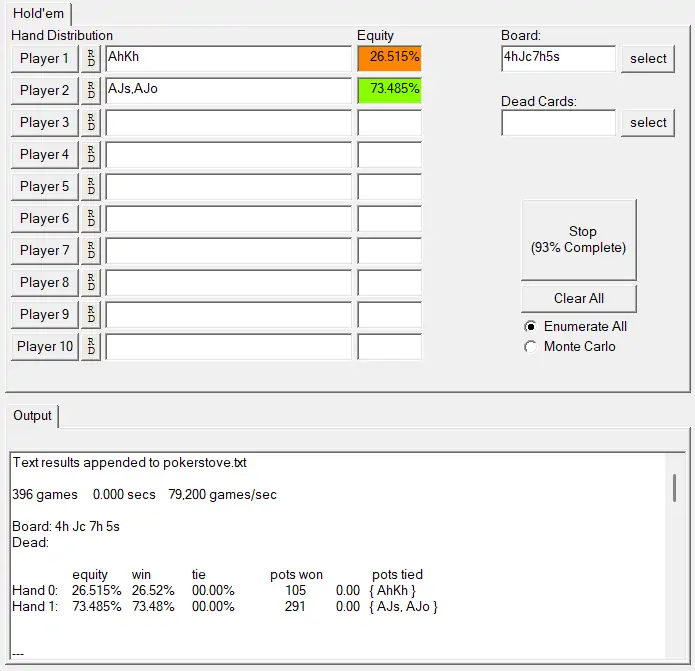
Equity of flush draw vs top pair on the turn.
Platform Compatibility & Download
There are both desktop (Windows only) and mobile versions of this calculator. So, you can quickly check the equity of hands you've played in the top poker apps for UK players.
Mac and Linux editions are not officially available. Punters try to access them via emulators and transition layer utilities, but not without issues.
It is very convenient to use a mobile app, especially when you play on a computer and want to calculate your equity concurrently. Of course, not in every hand but only in particularly essential moments (e.g. heads-up, where you have a monster and your adversary goes all-in, etc.).
PokerStove Download: Where to Get It?
Unfortunately, pokerstove.com went defunct in 2013, and the software is no longer supported for updates (final version: v1.24). Soon after, Andrew Prock, the developer, decided to open source the code and moved the project to github.com/andrewprock/pokerstove. You can start the PokerStove download there and get it as a static Win32 app.
Everything is still working – we checked and tested it personally (all screenshots and examples on this page come from it). However, it has a tiny window, which doesn’t scale due to the conflict between Win32 code and modern DPI scaling.
How to Run PokerStove on PC
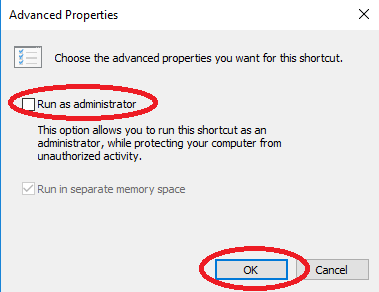
First, you need to configure the tool launch as an administrator. To do this, right-click on the software shortcut, select "Properties" – "Additionally", and tick "Run as administrator".
If you start it not through the shortcut but through the .exe file, click “Properties” with the right mouse button and select the “Compatibility” tab. Set a tick on the “Run this program as an administrator” item there.
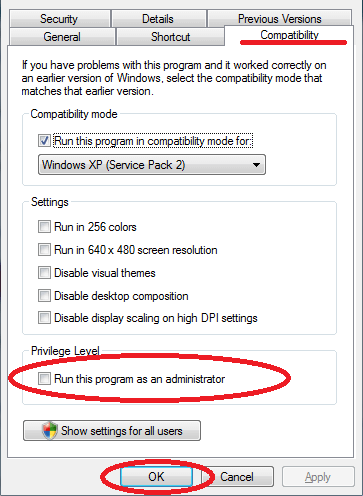

Failure to install the tool with "Run as Administrator" privileges may result in unstable performance, errors, and other issues.
How to Use the App on Android
Everything is very simple: you choose a card and indicate its suit; do the same operations for each player. Then click on the big orange button to see the results.
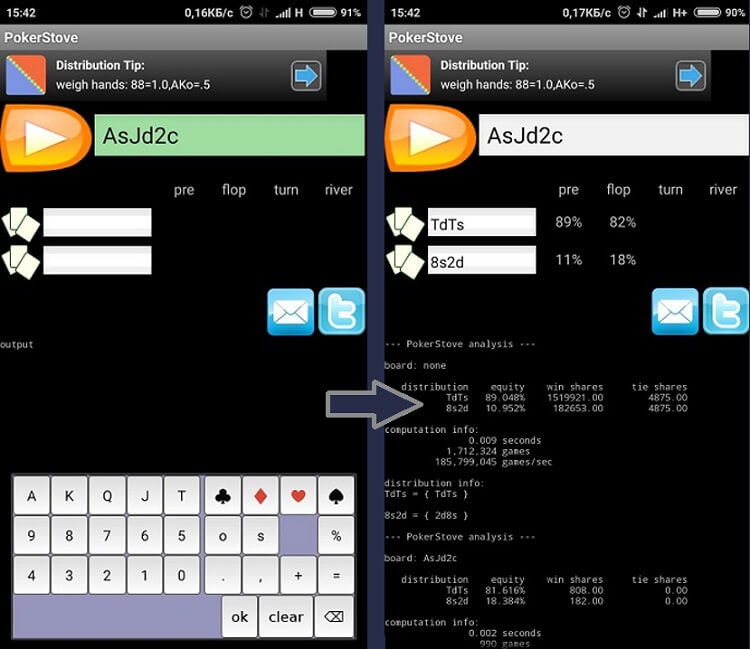
In a line, the suit is indicated not as an image, but as a letter ("s" – spades ♠, "d" – diamonds ♦, "c" – clubs ♣, "h" – hearts ♥). However, you select it as a picture at the bottom. You can also indicate suited cards (button “s” below the button of “diamonds”) or offsuit ones (button "o" below the button of "clubs").
During the game, you need to constantly keep the program's window open and enter data as and when the cards are dealt. Careful monitoring of the game will ensure the correct entry of data for calculation. When the time comes to fight against any of the players, you will already be prepared for a duel. By simulating various situations in your free time, you will have a clearer idea of which hands will be more profitable in certain cases.
⚠️ Warning: Formerly, you could run the PokerStove download on a smartphone or tablet from the Play Market, but it has been removed from the app store. Installation packages offered on the web might include malware. Please watch out.
Calculation Modes Examined & Compared
This software has two modes for calculating equity: Enumerate All and Monte Carlo. Let’s discuss each in more detail.
How Enumerate All Mode Works
The Enumerate All mode is a standard method for calculating your probabilities. When using this mode, you will get the computation of all possible hands. However, if there are many players in hand, it will take you more time to get the calculations when using hand ranges.
How Pokerstove Monte Carlo Mode Works
Monte Carlo is more suitable for complex simulations. It calculates random spots and displays winning odds. It may compute a huge number of various scenarios in a matter of seconds. Therefore, if you want your calculations to be more accurate, give the program more time for processing.
Comparing Two Methods
Now, let’s see how the two modes will handle the same preflop scenario: AA vs KK (typical “cooler”).
Hero holds AA, the opponent sits with KK and plays for the entire stack. Will it be profitable for the Hero to call in this case? The software gives the following equity estimations:
Mode | Runouts computed | Rounded equity | True equity |
|---|---|---|---|
Enumerate All | all possible | AA – 82%, KK – 18% |
|
Monte Carlo | 24,587,917 games | AA – 82%, KK – 18% |
|
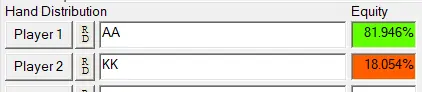
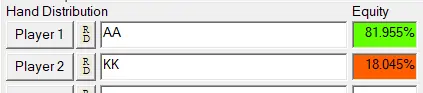
📌 Summary: Hero is a clear favourite regardless of the mode used. Aces will win in 4 games out of 5, and there’s just a slight shift between the outcomes. The calculation shows that pushing or calling someone’s push with pocket rockets (A-A) is always a proper preflop decision.
Comparing PokerStove With Alternative Software
Since there will be no more updates, we suggest you consider comparable tools. Check these software solutions for post-session analysis and how they compare to one another:
Program | Platform | Accessibility | Focus | Skill level | Best for |
|---|---|---|---|---|---|
PokerStove | Windows | Free | Computes hand equity versus one or several rivals | Beginner | Abandonware, we do not recommend downloading it. |
Windows | Basic version is free, while its Power functionality is paid | Calculates hand vs. range equity | Novice, intermediate, pro | Quick equity calculations. | |
Windows | Lifetime access with a single payment | Simulates different scenarios | Advanced | Checking how a range "hits" a flop. | |
CardRunners EV | Windows | Pay once, use forever | Models how profitable a specific line is against a certain foe | For deep study | Building complex decision trees to see EV. |
PokerCruncher | masOS, Android/iOS | One-time purchase | Flop texture analysis on Apple devices | Beginner to advanced | Evaluating very specific odds in tons of cases, on mobile or Mac. |
Allowed on Poker Platforms or Not?
We’ve checked for timely info and discovered that, in 2026, none of the UK poker rooms permits the use of PokerStove when the gaming client is running. The program is generally legitimate but not appropriate under this specific condition.
Although the industry does not consider the equity calculator as an RTA (Real-Time Assistance) tool, it gives the punter math edge over opponents. And policy standards classify this as cheating, similar to using bots and solvers. If you are caught, expect to be punished with a warning or a complete ban.
In particular, Poker Stove is prohibited while playing at:


#Ad 18+. Play Responsibly. UK first depositors only. Min. deposit: $10. Promo code: GET50. Bonus will be granted as tournament tickets gradually over 6 days and will expire after 24 hours. Full T&C apply. GamCare.org.


#Ad 18+ Full T&C apply. GambleAware. New UK players only; min £10 deposit; 100% up to £1,000 deposit bonus paid in cash. £50 Free Play in P$, Partypoker Tour Path & SPINS Overdrive tickets released over 6 days. 14-day ticket expiry.


#Ad 18+ Full T&C apply. GambleAware. First time depositors only. Min deposit $10. Select 'Match Bonus' in cashier. Max bonus $600. Bonus released in $1 increment per $5 paid in net rake/tournament fees. 90 days after eligible first deposit to unlock full bonus. Withdrawal restrictions apply. Up to 50% Rakeback for new players until 30.04, as newcomers skip straight to Octopus status in Ocean Rewards.
💡Our Recommendation: We strongly advise you to regularly check the list of "Prohibited Software" on the official site of your online poker venue. It often amends, and currently allowed tools may become forbidden at any time.
PokerStove Pros and Cons – Editor’s Take
Major advantages:
- Free version. You buy no subscription — all functionality comes at no cost.
- Comprehensible interface. From the drop-down menu to the card selection grid, everything is simple. Even complete newbies will execute their first calculation with no trouble or confusion.
- Instant and accurate outcomes. As soon as the user selects their hand and the opponent range, they momentarily get a reliable win, lose and tie percentage. No registration is required.
- Works for full and short tables. A person is able to calculate chances in the game against up to 10 opponents.
Many poker pros are satisfied with this program and recommend using it in the game.
Greg Walker, a professional player, believes that «if you only ever download one poker program, it should be PokerStove».
Major drawbacks:
- Technical abandonment. The original software hasn't been updated for over a decade, and no updates will come in the future.
- Restricted during active session. It is only appropriate for post-game analysis. Most sites in Britain, if not all, disallow running it with the open client – this breaks the fair play policy.
- Limited functionality. It uses a primitive calculation method which excludes blockers. Does not allow for weighted ranges and does not show how a specific range interacts with a specific board.
- No Mac and no Linux support. Punters must utilise emulators and WINE to run it, but we noticed many players complaining about this workaround due to incorrect launch.
Our Verdict on the Software
If you’re looking for a PokerStove equity calculator, you can find its "fixed" version on GitHub. It’s a lightweight tool to learn fundamental math for Holdem games, but for deeper study, Equilab will be both the safer and more practical choice today.
FAQ
💁♂️ Is PokerStove still available?
The original installer of PokerStove is no longer active. But on the web, you can find an open repository and compile it yourself or use ready-to-run binaries from third parties. There are also patched versions available on associated forums and sites. Be cautious when downloading these installers from random links to avoid potential malware.
🍏 How to run PokerStove for Mac computers?
Try Parallels Desktop or similar utilities for full Windows virtualization. For a lightweight setup, CrossOver and alternatives will be just fine. However, ensure you have an "expiration-fixed" version since the program is obsolete. Otherwise, search for equivalent software for macOS devices.
🎯 Does a PokerStove Omaha version exist?
No. For now, PokerStove only works with Hold’em, and its Omaha edition will hardly ever be released. Instead, consider Equilab or analogue software for this discipline. There’s a free plan for casual players and a paid subscription with advanced functionality for a deeper hand analysis.
📜 Is PokerStove legal to use on poker sites?
Unfortunately, poker sites usually prohibit this tool during the real-time game. Terms of service consider it a violation as long as you utilise it when the client is open. If you’re detected, your account may be frozen to clarify the circumstances. It will either be unblocked after a warning or banned forever.








Please, login or register.