
Sharkscope Online Poker Database Review

Sharkscope is an all-in-one database that provides information on the results of online poker tournaments. It runs independently of the poker rooms it connects with, thus collecting accurate and truthful stats. Simply by entering the username in the database, you access the essential stats. These form a picture of the opponent and help you pick the right strategy.
HUD functionality brings core metrics to the table and helps punters identify whether their rival is a passive fish or an aggressive regular. With Leak Detector, players will assess preflop aggression, blind stealing, and identify other flaws to boost the gameplay.
In this Sharkscope review, we’ll tell you how it works, what stats are available in the software, what extra tools it offers, and how to hide your information from public view. We’ll also reveal the nuances of subscription costs.
What is Sharkscope?
Sharkscope is a comprehensive poker database that provides information on online tournament results. Players enter their rivals' usernames in the search field to see the key profitability metrics, like ROI (Return on Investment), Av Profit, form, etc. It better fits regulars who need to improve their decision-making and complete a performance audit.
Sharkscope supports single-table SnG and multi-table MTT in Texas Holdem, and Omaha.
The app doesn’t track cash games. Its archive has been kept since 2006, although it does not guarantee the completeness of information — any user has the right to request a reset or block of their own stats.
Poker Rooms Sharkscope Connects With
The service retrieves stats from most networks, including:
- PokerStars
- 888 Poker
- PartyPoker
- iPoker
- Winning Poker Network
Some providers intentionally block the Sharkscope poker app in their tournaments, minimizing outside interference. However, experienced players collect statistics on these sites as well. To do this, they run the program from another account or activate it only after the end of the match. We recommend that you carefully study the rules of the site before using it to avoid being banned.
Sharkscope Basic Features Examined
This database is a collection of results from around 99% of all tourneys held on supported poker sites. Take a look at the essential functionality the users can benefit from:
- Detailed performance dashboard. The archive provides a wide range of information for deep statistical tracking. In addition to the numerical representation of data, punters view functionality in tables and graphs. Tables give us more detailed information about all the rivals’ games, while the graphs help us to evaluate their skills in a matter of seconds.
- Total & individual leaderboards. Users can access the leaderboard, where players are ranked by tourney type, year, stakes, cashes, etc. The performance of selected individuals is shown in monthly and yearly real-time rankings.
- Custom alerts. If you use this software for opponent tracking, set notifications for the punter you monitor. Thus, you’ll get a push notification as soon as your rival signs up for the tournament, so that you join it as well.
What Data Sharkscope Collects?
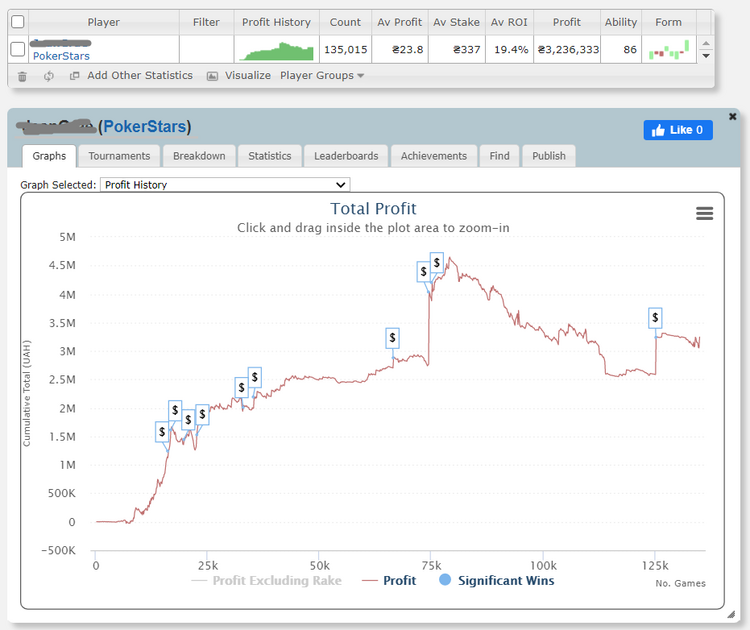
By opening the stats section, we were able to unload the following stats:
- Match outcomes categorized by dates, months, buy-ins, and game types, total cashes;
- Historical profit data;
- Finishing positions, including for the final table;
- Profitable and unprofitable days;
- Winning and losing streaks;
- The percentage of frequently beaten fields;
- Return on investment or win rate (ROI).
Extra Tools in Sharkscope Poker App
Opponent tracking isn’t the only power of the Sharkscope software. See what tools help seasoned players to improve their play.
HUD (Heads-Up Display)
All owners of Silver status and higher get the stats add-on and can enable it during real gameplay. HUD takes information on punters from the database and transfers it directly to your table.
Sharkscope HUD supports Holdem, Omaha Hi, Omaha Hi/Lo, Omaha 5, Omaha 6 and Courchevel.
It eliminates the need to waste time browsing foes in the register: pick 6 important values out of 30 available to understand who sits next to you. The stats display shows VPIP (Voluntarily Put Money in Pot), profit, pre-flop Aggression, PFR (Pre-flop Raise) and lots of other statistical data. You can adjust the display as you desire and pick the stats that give you the most information for informed decisions.
AI Hand Analysis
Sharkscope has also become a self-learning tool, where AI algorithms have replaced the real mentor. It’s necessary to insert a hand history file into the website and get expert analysis of their performance. One analysis costs 5 searches, and it is only available to subscription owners.
This tool analyses the decisions you made, explains which moves were good and which led you to failure. Except for analytics, AI suggests the optimal play for each spot you pick.
Leak Detector
Sharkscope Desktop users can spot potential flaws in real-time with Leak Detectors. It analyses the history of your past hands in tournaments and ring games, applying the following filters:
- Preflop aggression. Identifies whether you have enough aggression for each starting position.
- Positional awareness. Checks how tight you play for the corresponding position.
- Blind stealing: this leak filter tracks how often you try to steal blinds from late positions.
- Pocket pairs. It analyses whether your optimal VPIP rate aligns with the 85% threshold for pocket pairs AA-88.
- Suited connectors. With this instrument, you gain insight into whether your attempts to enter the game with suited connectors are effective.
Sync
This is a side tool ensuring that information about your hands in the local tournament database is correctly tracked and reflected in Shark Scope. It comes as part of the Silver plan and higher. With it, you can synchronise up to 100 tourneys for 3 minutes. Sync runs in the background, tracks your performance in Sit & Go’s or MTTs, and uploads results to the Sharkscope poker database.
How to Find Your Opponent in Sharkscope
The process is as simple as possible — you spend from a few seconds to a couple of minutes even in the basic version.
To get all the information you need, follow these step-by-step instructions:

Open the service's website, launch the desktop program, or turn on the mobile app.

Find the line "Player search" and enter the nickname of your opponent in it.
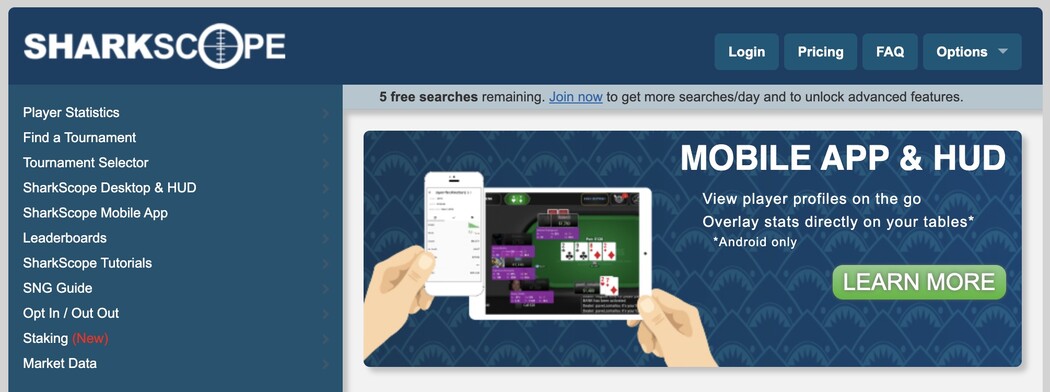

If there are many people with similar names registered in the system, select the desired one from the drop-down list.

Wait for the database to find the information — processing time will depend on the current load on the service.
![Maksym Baksheiev]() Maksym BaksheievCEO of Cardmates UK
Maksym BaksheievCEO of Cardmates UKWe should remind you that Sharkscope only collects statistics of game results. This means that the focus of the app is on long-term profitability or unprofitability rather than playing style.

Sharkscope Ability Metrics and What It Means
Sharkscope Ability is an integral indicator that characterises a player's skill. The service uses multiple states to calculate it. Ability Rating varies from 0 to 100. See the breakdown of ability ranking levels below:
- Up to 60. It is a recreational punter that joins the table for entertainment, having zero knowledge of positional awareness, EV, etc.
- 60 to 80. This value is assigned to players with basic knowledge of poker but who still fail to build comprehensive strategies.
- 80-90. If your rival has an ability rating of over 80, you’re sitting against a seasoned grinder, an expert in hand reading.
- 90 and higher. A champion who dominates high-stakes fields and takes down international tournaments with deep knowledge ot Game Theory Optimal (GTO).
How to Reset or Stop Data Tracking?
We have already mentioned that statistics can be incomplete — the database may delete or reset records at the user's request. Fortunately, this does not happen very often — this feature is available only to paid subscription owners. In reality, only a few players use it.
If you are not satisfied with your statistics in Sharkscope, reset them or stop collecting data altogether. To do this, select the appropriate item in the menu and submit a request. See the data to specify in your request:
- poker network address
- nickname
- reset date (for resetting only)
The downside of SharkScope is that you will have to repeat this procedure for each game room separately. However, the successful deletion is guaranteed. After our team conducted the test, the data was completely removed from the archive — it was inaccessible even to us.
Sharkscope Subscription Plans & Pricing
The basic version of the application is available for free. View data for 5 players per day with zero cost, but overall functionality is limited. For example, the free Shark Scope lacks filters for results by game type and dates, ROI, and streaks. In addition, you can't lock and reset personal stats.
So we were more interested in paid subscriptions. Sharkscope offers 5 Personal packages that fit “fishes” best, and seasoned regs will find decent functionality among the 4 Pro subscriptions. Let’s consider the Personal options:
- Bronze – $7 per month – 10 searches per day and all possible features;
- Silver – $13 per month – 150 searches per day and a HUD to automatically display rankings in the room;
- Gold – $28 per month – 1,000 searches per day, hand history tracking, and detailed guides.
- Platinum – $42 per month – 3,000 searches per day, Hand Tracking software and SNG guide.
- Diamond – $84 per month – 6,000 searches per day and other features from the Platinum plan.
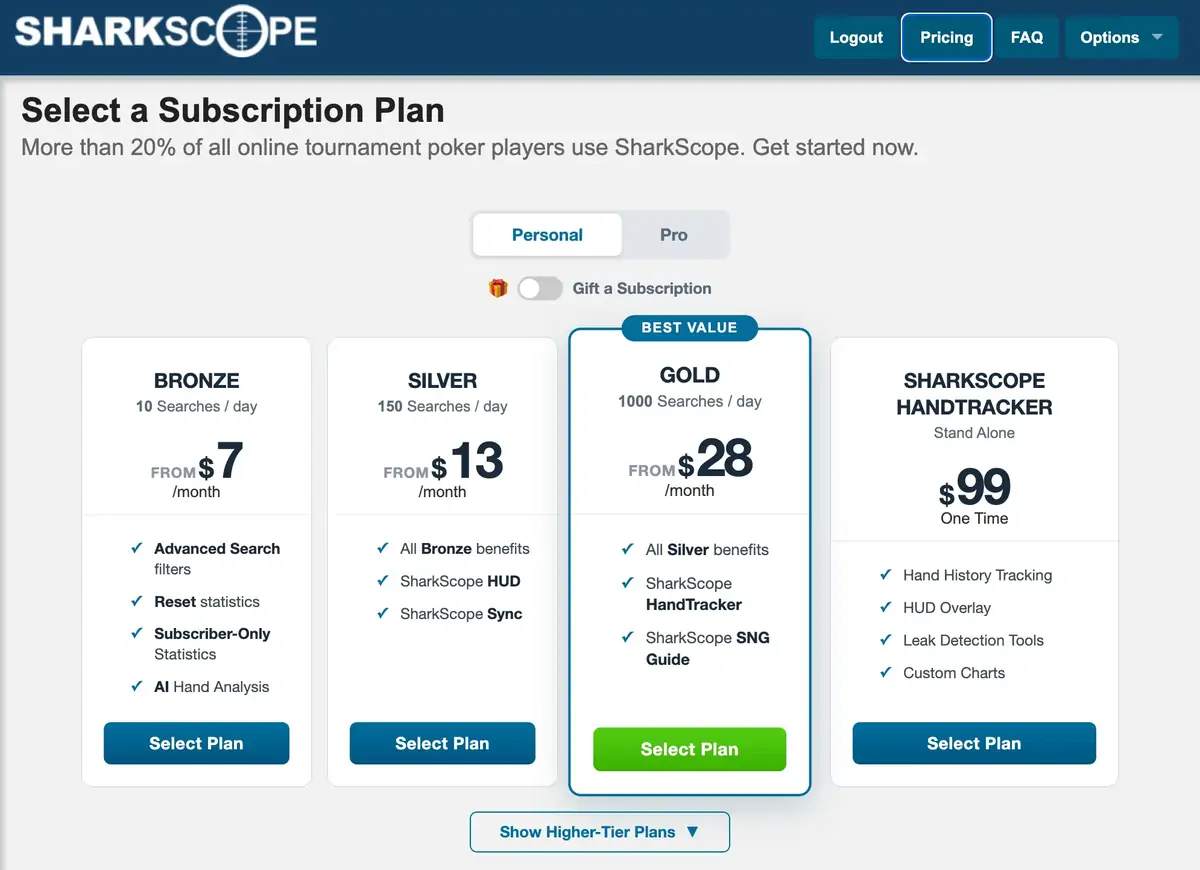
You can buy a separate Sharkscope HandTracker app with maximum subscription features, error detection tools, and custom charts for $99.
Experienced grinders utilise API, may enjoy reduced search costs, and unrestricted tournament access with pro packages. The prices start at $200 to $2,500 per month.
![Maksym Baksheiev]() Maksym BaksheievCEO of Cardmates UK
Maksym BaksheievCEO of Cardmates UKIs Sharkscope worth the price?
This subscription pays for itself if you pick the plan wisely. The scalable pricing structure and presence of Personal and Pro plans make it a versatile tool for regs and recreational players alike. For me, the Silver tier brings the most value, with 150 searches, Sharkscope HUD, and synchronisation of results.

Our View of Hits & Misses
- A comprehensive poker database that tracks 99.9% of online tournaments from major networks.
- Flexible pricing packages, starting with affordable options for beginners as well as large subscriptions with 6,000+ searches for professionals.
- Offers a wide set of extra tools, such as Sharkscope HUD, Leak Detectors, AI Hand Analysis, etc.
- Allows sending a custom notification as soon as the selected foe signs up to the new tourney.
Unique Ability Rating metric helps differentiate the elite tournament crasher from the recreational punter.
- It is tailored to SnGs and MTTs, so it may not provide opponent metrics for cash tables.
- Some hand results may not be tracked as the site respects privacy and can remove one’s data upon request.
- It may be a violation of the Terms of Service (TOS) in some rooms, e.g., GGPoker.
Final Verdict: Is Sharkscope Right for You?
The Sharkscope app is of particular interest to those new to sports poker as well as tournament grinders.
This poker app is super effective for data tracking. MTT and SnG players gain insight into the key stats on the rival and thus have an advantage, and they’ll appreciate the functionality of the HUD. With the deep analytics of flaws, Leak Detector providers, both the intermediate and seasoned punters, will be able to boost their own strategy knowledge.
If you’re the cash table grinder or play poker as a hobby, this is not the software you need. Be sure to check if Sharkscope supports the site you play before purchasing a subscription.
FAQ
✅ What is the SharkScope poker app used for?
It’s the largest online poker database, where players have been tracking tournament results for more than 20 years. Grinders can use data to track their opponents’ performance and thus assess their skill levels. Additionally, the HUD shows the key stats you pick during the real play. Leak Detector expands the database functionality with analytic capabilities.
📜 Is SharkScope legal to use?
Its legality depends on the rules of the selected UK poker room. The Terms of Service of most sites allow tracking of tournament history in real time. Some of these are PokerStars, PartyPoker and 888Poker. It’s necessary to verify whether the service supports the platform of your interest.
📊 How to open statistics on Sharkscope?
You can opt in via the eponymous tab on the official website. First, access the form and pick the supported poker site. Afterwards, you’ll need to meet your poker room’s conditions: enter your username and attach a screenshot of your profile. The database accepts your application, so your data becomes visible to every other Sharkscope visitor.
⭐ What is a good ability rating on SharkScope?
Any score starting with 70 in the unique Sharkscope ability ranking system is considered a good rating. It’s usually assigned to the regular who has basic knowledge of poker mechanics and even performs well in mid-stakes tournaments. If you see a rating of 80 and higher, you’re sitting next to the seasoned pro. Punters with 90+ points are the elite professionals dominating the international matches.
💸 How to access the Shark Scope service for free?
Every visitor is allowed to have 5 daily inquiries in the database for free. Just insert the player’s nickname in the Search field to retrieve the basic data. However, some of the advanced filters, such as re-entry analysis or the most frequent opponents, aren’t available. HUD, Leak Analysis, and other advanced features require purchasing a subscription.
❌ Can I opt out of SharkScope tracking?
Go to the tab labelled the same way on the website and pick the poker room you play in. Fill out your username and any other required info. Click the Submit button, and your tournament history as well as your screen name will be blocked from public view.








Please, login or register.