
Hand2Note: Software Review

Today, we will discuss Hand2Note (H2N), which you can legally use in most poker rooms. It boasts a variety of interesting features.
This software is an excellent option for people with computers with weak technical characteristics. The program works with a remote statistics database, eliminating the need for local storage. As a result, it delivers superior performance.
Developed by professional players, Hand2Note provides ample opportunities for your game, combining convenience, high speed and flexibility of settings.
Create HUDs, pop-ups, and regular/complex stats in a short amount of time – advanced functionality allows for quick settings and convenient utilization. Find out more in our Hand2Note review.
Hand2Note Capabilities
The program's interface is quite pleasant and user-friendly, in contrast to that of Holdem Manager 3.
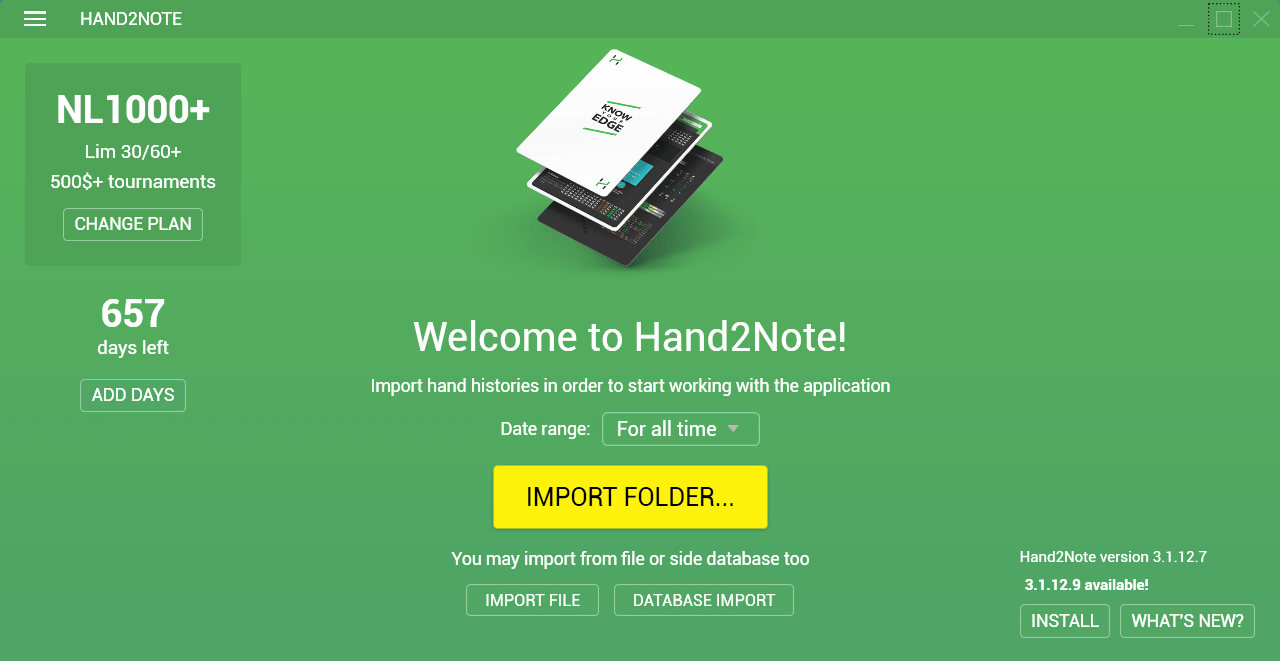
Here are the main functions that H2N is designed to implement, along with a set of unique features not found in other similar tools:
- Dynamic HUD (it's allowed in 888, bwin.party and iPoker rooms) – displays statistics on players taking into account positions, bet sizings, stack size, number of foes at the table, and more. You can choose which HUD to run: static (classic), positional or dynamic.
- Exclusive statistics that enable distinguishing between playing against regulars and fish (reg vs reg or reg vs fish).
- Minimum PC requirements: 1 GB of RAM; Windows 7 and higher.
- Displaying stats directly versus you (vsHero) is a very useful feature since we don’t play identically with all opponents; they adjust to everyone.
- High speed of work due to innovative data processing technologies and transmission (it works much faster than similar software and is less demanding for hardware). On average, the H2N database takes 250 MB per million hands.
- Viewing hands with showdown when you were absent (for example, when multi-tabling).
- Displaying ranges of preflop calls and raises by participants in the hand.
- Capability to quickly load up to 3000 hands per second.
- Importing data collections from Holdem Manager and Poker Tracker 4.
To unleash the full potential of Hand2Note, it is recommended to combine it with StarsHelper or SessionLord (on PokerStars), PartyCaption (in rooms of the bwin.party network) or 888Caption (in 888 network skins).
HUDs: Static, Positional, Dynamic
The team behind H2N comprises ambitious poker players actively involved in high-stakes games. As avid users of Heads-Up Display, they have allocated significant importance to this tool within the software. Thanks to the embedded "HUD Designer" and flexible settings, you can create three types of HUDs, which will allow you to display only the necessary statistics that are required for the game at the moment.

It means the classic display of stats, where one HUD is shown for all punters, regardless of your position at the table, opponents' stack sizes and actions and other factors.

This HUD displays the required statistics on players regarding your current position at the table.
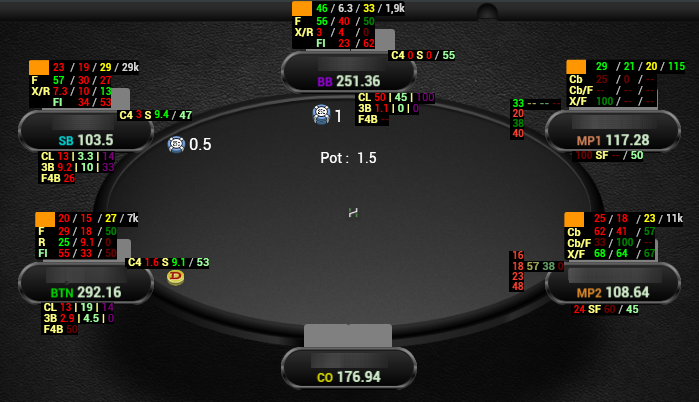
In other words, the program can display some stats on players who have already taken their actions in front of you. Also, it can show completely different stats on those whose turn is still ahead.

This type encompasses all the features of positional HUD and offers even more flexible options for displaying poker statistics.
The Dynamic HUD can change depending on the player's actions. It displays additional statistics only after appropriate actions: change of stats when using certain bet sizes, displaying of required ranges directly on the poker table in the form of preflop matrix or postflop range diagrams, and other options that make the game more convenient.

Positional and dynamic HUDs are banned on PokerStars. The poker client automatically blocks their functionality in adherence to the room’s policy. All other essential functions, including the classic HUD, will be working correctly.
Fix Hand2Note HUD Missing on Tables
- Make sure there’s no auto-import conflict.
- Use StarsHelper when playing ZOOM.
- Enter the chat settings and check whether the “Everything” option is activated.
- Check whether you have installed the latest software version.
- Make screenshots of your mistake and send them to support@hand2note.com.
How to Set Up Auto Import in Hand2Note
Follow these steps:
- Find the folder where your poker room saves hand histories, then add it to Hand2Note via Configuration → HUD → Auto Import.
- Check whether the check mark is put, which is responsible for saving hands to the hard drive of your personal computer.
Setting Up Auto Import From a Third-Party Database
- Activate the checkmark Import from the side tracker database in the settings. (Configuration → Hud → Autoimport).
- Select the working database from Holdem Manager or Poker Tracker for your hands to be taken from there, rather than from folders.
- Check whether your data collection is active in Hand2Note settings.
Popup Editor, Quick Notes and More
The embedded editors allow you to create your own HUDs and change entire blocks of pop-ups by developing the combined pop-ups, including diagrams, notes, filtered lists of hands and multilevel tabs.
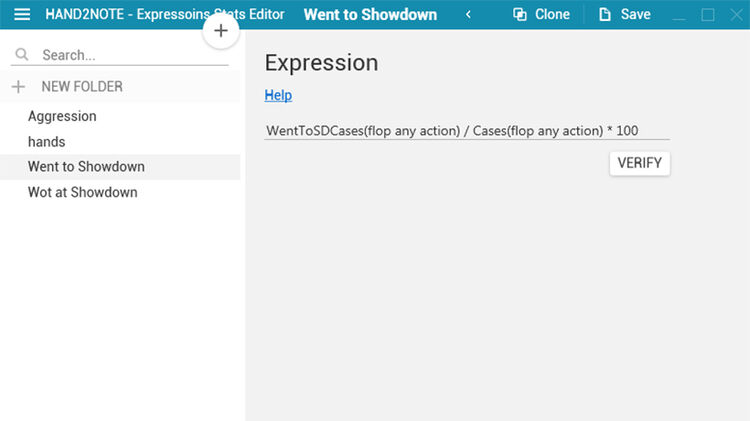
For more advanced punters, the program offers a special section that allows for adding complex statistics based on mathematical formulas.
Breaking stats by "reg vs fish" and "reg vs reg" spots
Regs often face a common problem when playing with other regs. This problem lies in a distortion of statistics due to the fact that everyone plays against recreational players from time to time, but the game strategy against fish differs significantly from approaches against regular users.
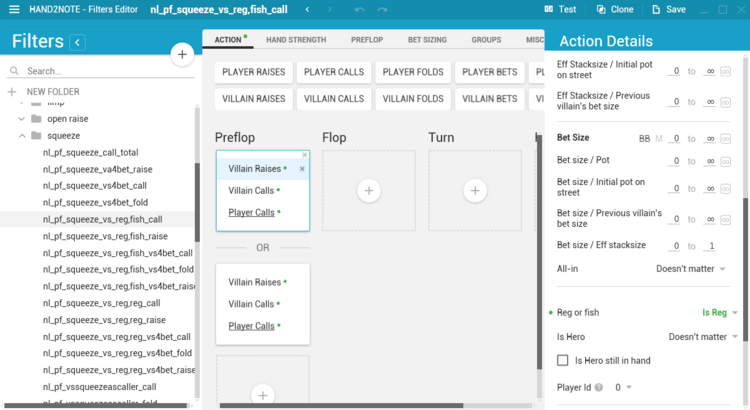
Considering this, the software developers have included a feature that allows for the division of hands (and statistics) based on game situations like "regular versus fish" and "regular versus regular".
"Quick note" option
This function is designed to speed up and simplify the process of creating notes on the opponents by means of templates.
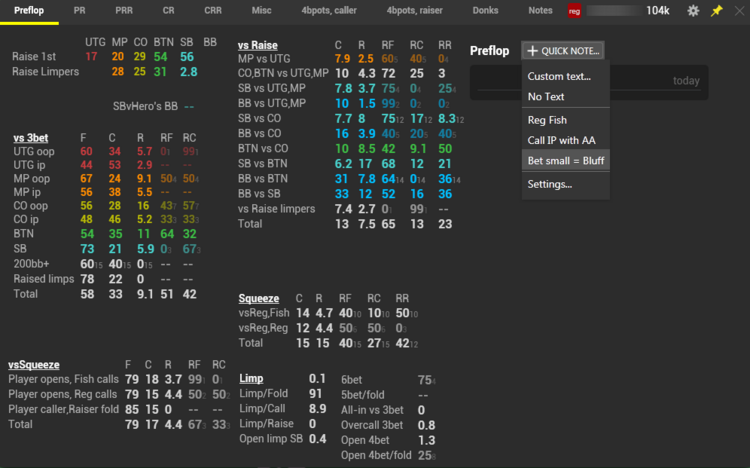
Moreover, if you have a large number of comments, the software offers to “tie” notes to corresponding stats or add them to certain groups. For example, you can create groups of remarks such as "preflop", "3-bet pots", and "2-bet pots", and then add each note to a specific group.
Analysis of opponents
You will not face any challenges with analyzing the opponents' play outside the tables, as this process is facilitated in Hand2Note. For example, you can get information about the foe's ranges in certain situations by simply hovering over a certain stat.
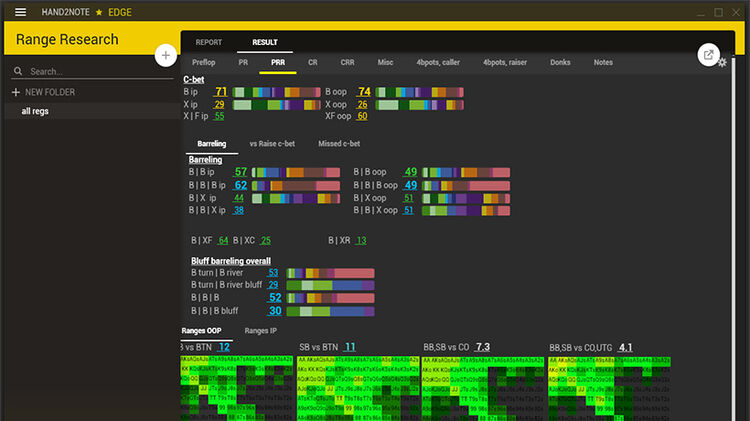
The creators guarantee high speed of operation when working with pop-ups and diagrams. It has a small database size. E.g., a database that consists of a million hands takes only 200-300 megabytes. Import speed implies 1500-3000h/per second.
Range Research & Decision Analysis
Let's talk separately about such tools as Range Research and Decision Analysis, which are available only for "Edge" subscriptions (39$ a month or 359$ a year).
Range Research is a tool for analyzing a range of opponents on which we do not have enough hands. The mechanism of work is very simple. For instance, when you have a situation where you need to choose between a call and a 3-bet, you open a tool window and fill in the required fields. The program analyzes players with similar indicators and displays average statistics.
Decision Analysis is a tool of research for the profitability of your actions in different situations, which includes three functions:
- Action Profit – displays what profit you had when collecting different combinations (on big blinds for 100 hands):
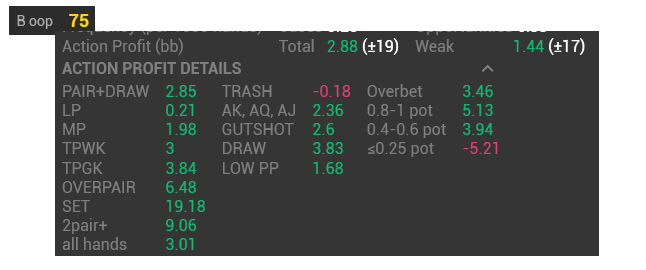
Action Profit is calculated as the difference between your stack at the end of the hand and before committing a certain action.
- Spot frequency shows the frequency of occurrence of certain game situations.

In the picture above, Spot Frequency shows that the statistical indicator "a continuation bet of opponent with no position on you" is 5.34. At the same time, the situation in which the continuation bet was justified (it was not a bluff) has occurred 6.45 times per 1000 hands.
Cases – the frequency of committing the action.
Opportunities – the possibility to commit the action.
- Next Villain's Actions. With its help, you will learn how your opponent will react to your bet.
In the illustration below, an FCR stat (CHECK RAISE) shows a percentage of opponents’ fold to your raise/call percentage / raise percentage. BX is Bet and Check.

How to Delete Statistics in Hand2Note
It is not possible to delete specific stats or data on certain opponents in Hand2Note. The software doesn’t allow partial removal of statistics, so you will not be able to cut a few hands or numbers tied to one player.
The only solution is to form a new data collection. This option lets you wipe the slate clean and start tracking your stats from scratch.
Steps to Create a New Database
- Enter the program.
- Go to the “Settings” section.
- Click on the “Create base” button.
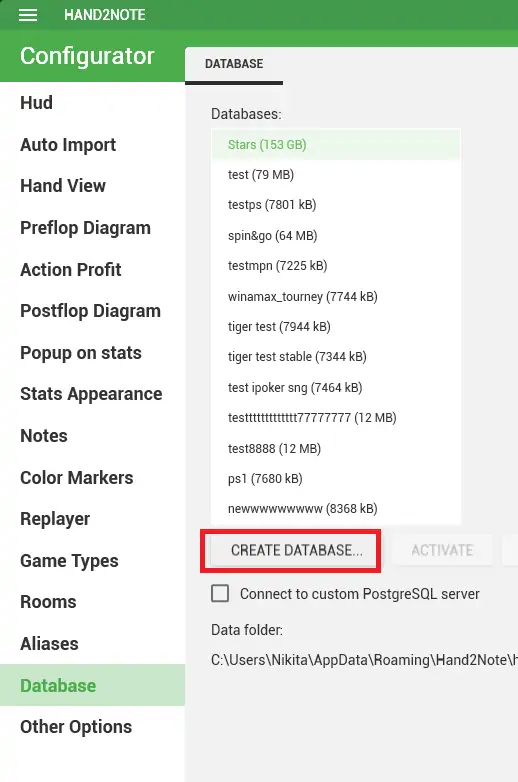
After that, the base will be cleared, and it will have exactly 0 hands. While the software doesn’t support partial deletion, resetting with a new database is simple and effective. Many players even use multiple data collections for different formats (cash, MTTs, spins) to keep their analysis organized and clean.
Hand2Note App Settings
- F12 – quick access to the settings. Press it while H2N is running, and the settings window will open in front of you.
- F3 – reports on cash games and tournaments. Monitor your game results by using many filters on the left side of the screen.
- F4 – sessions. Watch your session results for a given day, period or for all the time.
- F5 – HUD editor (more on this below)
- F7 – stats editor. Set icons with filter conditions that will be useful for creating your own HUD.
- Difficult stats – these include several stats with mathematical formulas. E.g., 4Bet Range and etc.
Let’s examine a few more points that can cause difficulties.
HUD editor
At first, you should choose the element you want to create.
There are all possible stats on the left side, which you can utilize to build your own HUD and pop-ups. For this, import the selected stat to the table cell.
You have an opportunity to choose the size, color, background for the stats.
There are instruments for HUD settings on the right side.
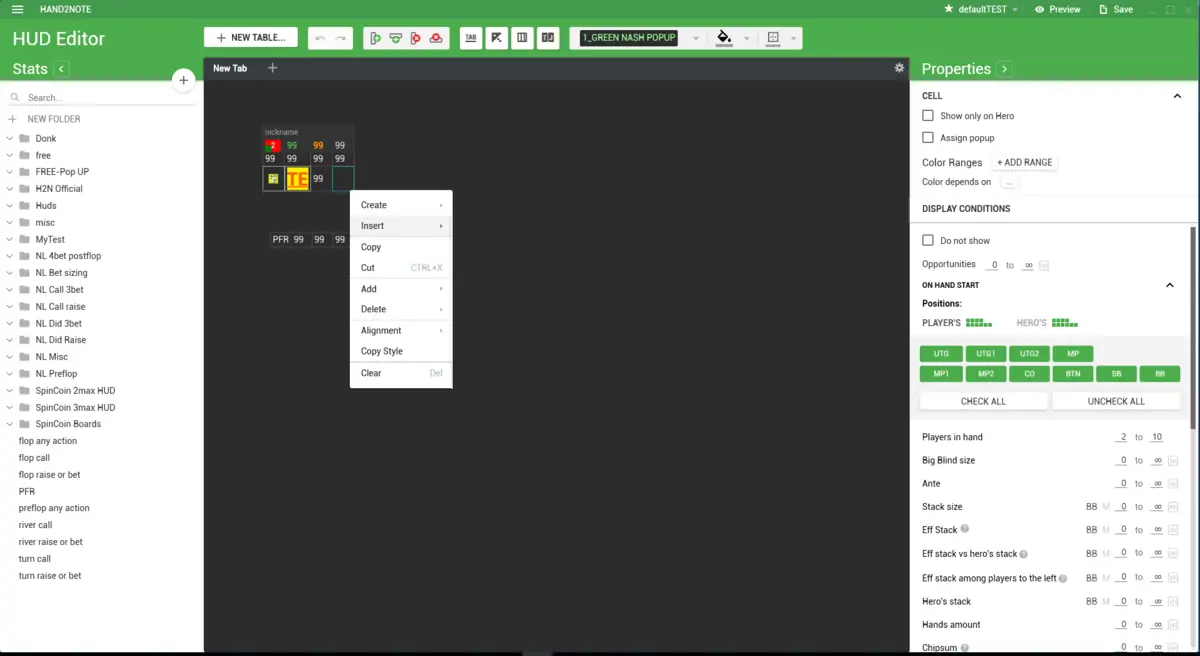
Here, you can edit pop-ups, set conditions for displaying specific stats, and color-code stats based on their values.
Specify which HUD and pop-up to use for different game types and table sizes.
«Color marks» section
H2N figuratively divides players into regs (regular and strong) and fish (weak or recreational). You can help it determine the reg. By default, the fish is a player with a VPIP of over 30 and a PFR of over 25. In the “Color marks” section, select the color to mark regs and one for fish.
«Alias» tab
To combine your play stats from different poker rooms, enter the tab “Alias” and click “Add”. You create the title for your public profile and select sites + nicknames under which you play. Thus, you can analyze your game on several platforms simultaneously.
Hand 2 Note Price and Free Trial
Several subscription plans work both monthly and yearly. Here are examples of the monthly costs for this software:
- Base – free of charge (unlimited stakes).
- Asia – $29.90 (for non-UK players using Asian apps and sites).
- Edge – $19.90 (dynamic HUD, range analysis).
- PRO (Asia + Edge) – $49 (all rooms, full functionality).
Currently, there is no lifetime license for H2N, but you can download it without cost.
How to get H2N for free?
The trial period lasts 30 days and covers full functionality except for the Range Research feature (no restrictions on stakes). It activates automatically once you launch the program for the first time. There is a separate testing version designed specifically for Asian rooms, but it is freely available only for the initial 14 days (activation process is identical). This is a great offer for micro-stakes players who are just starting to explore poker software.
Main Advantages and Benefits
- Ability to create graphs, sessions and reports for the cash tables and tournaments. Using filters, you’re able to set unique reports like “Winrate on the tables without fish”.
- Easy-to-use and quick tool for analyzing opponents. H2N displays interactive pop-ups for each stat, makes preflop and postflop diagrams, compiles a list of deals, etc.
- High-performance rate. The system imports from 1,500 to 3,000 hands per second from the database. Pop-ups, diagrams and notes open instantly. The hand history doesn’t take much space.
- Productive and accessible editor of HUDs, pop-ups and stats. You can easily create and edit all this, based on the players’ position at the table, board strength, bet size, hole cards and more.
- A qualitative approach to recording notes. You can insert them into your hand with just a few clicks or by dragging them with a cursor. You can utilize the templates and write notes on individual stats.
Poker Rooms That Allow H2N Software




#Ad 18+ Full T&C apply. GambleAware. UK first depositors only. Min. deposit: $10. Promo code: GET50. Bonus will be granted as tournament tickets gradually over 6 days and will expire after 24 hours. Full T&C apply




#Ad 18+ Full T&C apply. GambleAware. New UK players only; min £10 deposit; 100% up to £1,000 deposit bonus paid in cash. £50 Free Play in P$, Partypoker Tour Path & SPINS Overdrive tickets released over 6 days. 14-day ticket expiry.



#Ad 18+ Full T&C apply. GambleAware.org. First time depositors only. Min. deposit £10 with code 'STARS400'. Play on any real money table on the site within 120 days after making eligible deposit. Bonus released in £5 instalments every 100 redemption points. No withdrawal during bonus period. Please play responsibly.
Our Verdict on the Program
Hand2Note has many advantages over competitors, thanks to minimal OS requirements and unique functionality such as Dynamic HUD. As for disadvantages, there is a need to set up additional software for different poker rooms.
FAQ
💁♂️ What is Hand2Note?
This is a specialised software designed to display poker statistics on the table, allowing one to create and use positional and dynamic HUDs, popups, visual presentation of preflop and postflop ranges as well as additional stats.
💶 Is Hand2Note free?
There’s a free trial available for the initial 30 days after launch; then, you will have to buy a paid version. If you are looking for a flexible and intuitive interface with full statistics, pay attention to this tool – it is suitable for both novices and savvies.
⚙️ How do I set up Hand2Note?
- Download H2N from the official resource and install it.
- Connect your poker client(s) by selecting the correct hand history folders.
- Anable auto-import to track hands in real time.
- Set up HUD by choosing a default or customizing stats.
- Play a few games to confirm everything imports correctly.






Please, login or register.